声明:本说明书著作权归杭州睿登科技有限公司所有,未经允许任何单位或个人不得用于商业用途。
10
or press the encoder potentiometer to cancel.
Press “SHIFT”+ keypad button 1-9 to quick call out the saved data (as shown
above). Press “ENTER” to confirm, or press the encoder potentiometer to cancel.
1.4.2.4 Keypad lock and unlock
Keypad lock operation video:https://youtu.be/zxpmasJyQ6Y
Press “SHIFT”+”LOCK” to lock or unlock the keyboard. And the keypad will be
automatically locked when communication starts, there will be displayed on the
top (cannot unlock manually), and the keypad will be automatically unlocked when
the connection disconnected manually, there will be displayed, the keypad will
be automatically unlocked when the connection disconnected abnormally, and the
power off button can be used when the keypad is locked.
1.4.2.5
System Setting
System setting operation video:https://youtu.be/Q9d3rIgIrOc
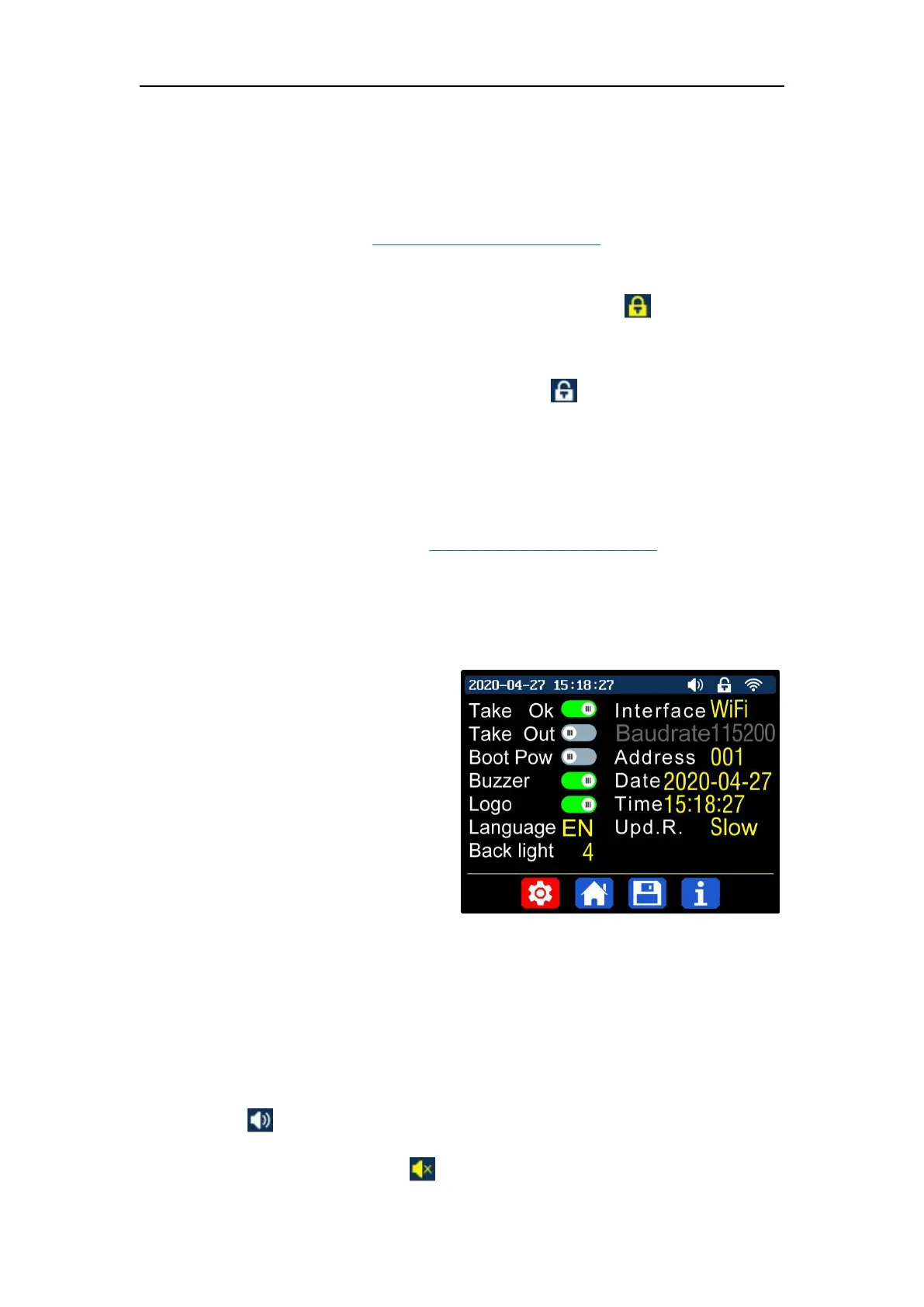
Press “SHIFT”+”MENU” to enter the system setting menu as shown below, press
“ENTER” to enter the menu, press direction button to select option, the option in red
is the option be chosen, rotate the encoder potentiometer to change setting.
Turn on the “Take OK”, a
confirmation window will pop up when
you quick call out a data group. If you
turn it off, the setting values will be
modified directly when you call out a
data group.
Turn on the “Take out”, the output
will be turn on automatically when you call out a data group. If you turn it off, the
output will keep the previous status.
Turn on the “Boot Pow”, it will turn on the output automatically when start. If
you turn it off, the output will keep OFF status when started.
Turn on the “Buzzer”, you will hear button tune when press the button, and
there will be on the top. If you turn it off, there will not be button tune when
press the button, and there will be on the top.



 To Next Page