10
DISPLAY PANEL MESSAGES
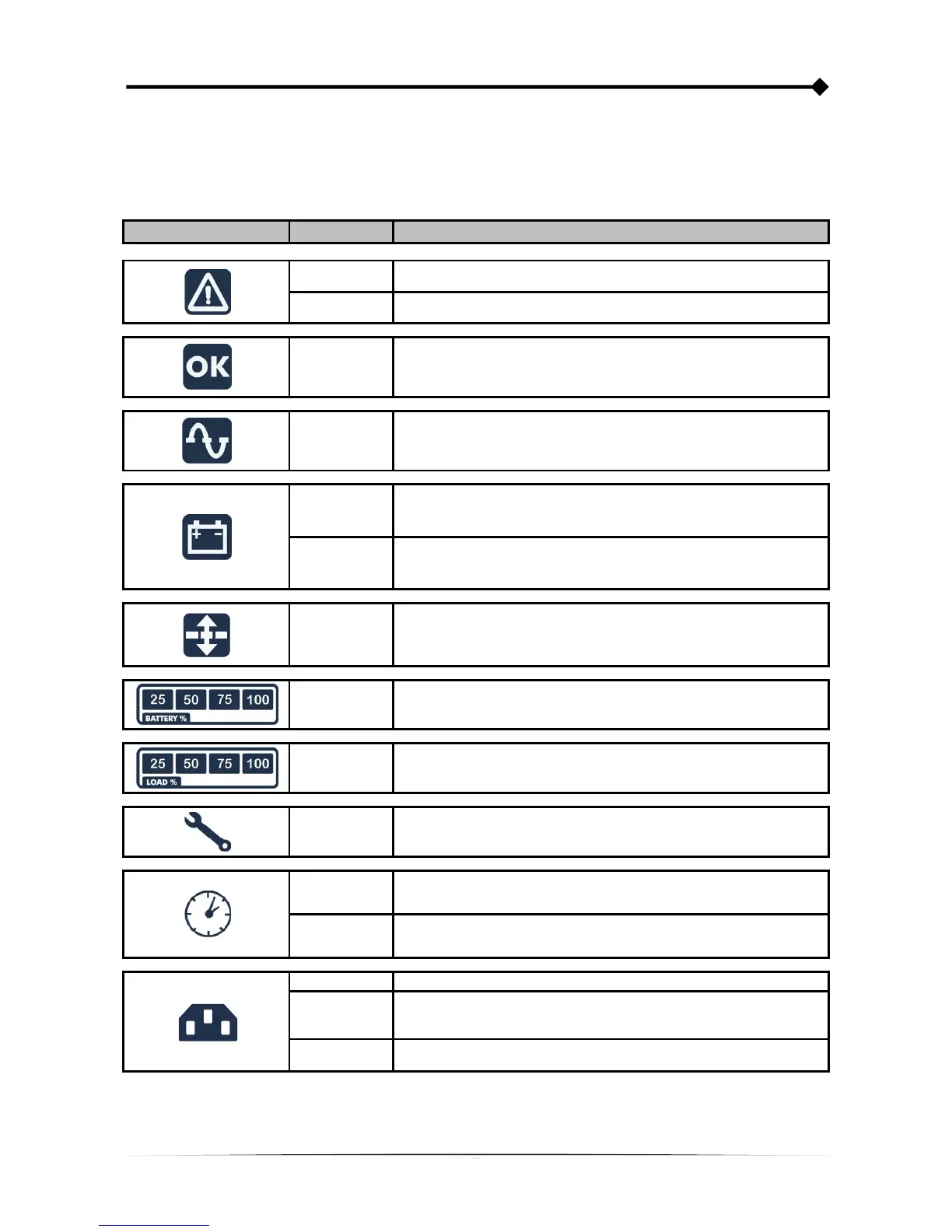
This chapter describes, in detail, the various information that can be displayed on the LCD.
UPS STATUS MESSAGES
ICON STATUS DESCRIPTION
Fixed Indicates a fault
Flashing The UPS is in stand-by mode
Fixed Indicates regular operation
Fixed The UPS is operating from the mains
Fixed
The UPS is operating from the battery. In this condition, the UPS emits
an acoustic signal (beep) at regular 4-second intervals.
Flashing
Low battery pre-alarm. Indicates that battery autonomy is coming to an
end. In this condition, the UPS emits a beep at regular 1-second
intervals.
Fixed AVR active
Dynamic Indicates the estimated percentage charge of the batteries
Dynamic
Indicates the percentage of charge applied to the UPS compared with
the nominal value.
Flashing Maintenance is required. Contact the support centre.
Fixed
Indicates that the timer is active (programmed switch-on and switch-off).
The timer can be activated/deactivated using the software provided.
Flashing 1 minute until the UPS switches back on or 3 minutes until it switches off
Off * The EnergyShare sockets are not configured. (Always active).
Continuous*
Using UPStools software an event associated with the EnergyShare
sockets was configured (e.g. end of discharge pre-alarm threshold) but
the sockets are active at this time.
Flashing *
The associated event occurred; the EnergyShare outlets have been
disconnected.
* For more information about the configuration of the EnergyShare sockets, see "Additional Features"









 To Next Page