16
BATTERY PACK REPLACEMENT
The UPS is also equipped with a dedicated battery pack that allows for easy replacement of batteries (hot swap) in
complete safety, thanks to the protected connection system.
• WHEN THE BATTERY PACK IS DISCONNECTED, THE LOADS CONNECTED TO THE UPS ARE
NOT PROTECTED IN THE EVENT OF A MAINS FAILURE
• THE BATTERY PACK IS VERY HEAVY. USE EXTREME CAUTION WHEN REPLACING IT.
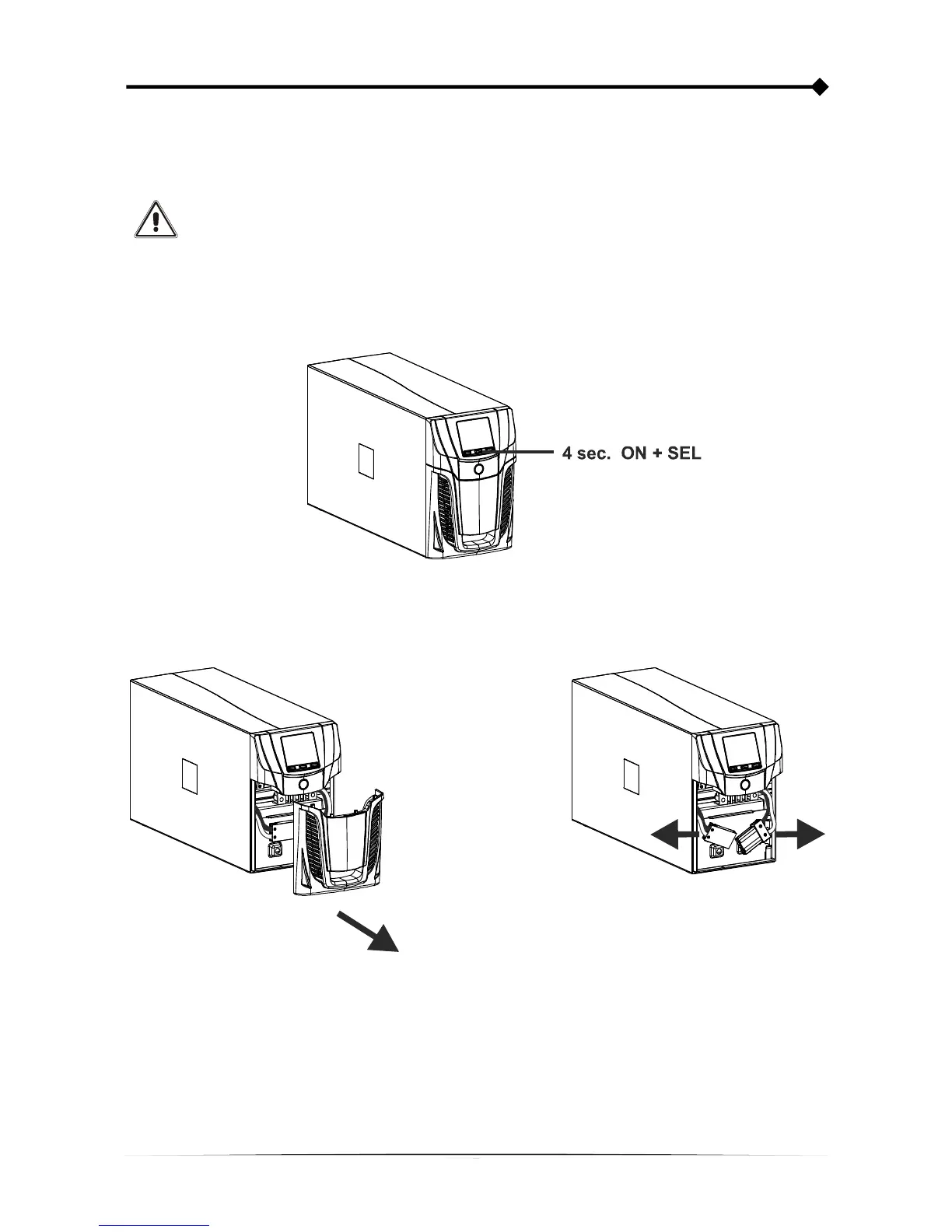
1. Set the UPS in “battery swap” mode by pressing and holding both the ON and SEL button for 4 seconds (See
par. USE / Operating mode configuration) on the display will appear the code “C02” NOTE: in this condition the
load is powered from the mains supply.
2. The battery pack is positioned behind the UPS front panel. Remove the front panel as shown in the figure
below. Disconnect the connector that connects the battery pack to the UPS.









 To Next Page