EasyManua.ls Logo

Rimage Prism - Identify the Parts of the Prism Printer; Front View Description; Control Panel Overview; Operator Button Functionality

Rimage Prism
174 pages
Print Icon
To Next Page IconTo Next Page
To Previous Page IconTo Previous Page
Loading...
Rimage PrismPlus!
2 110635_I
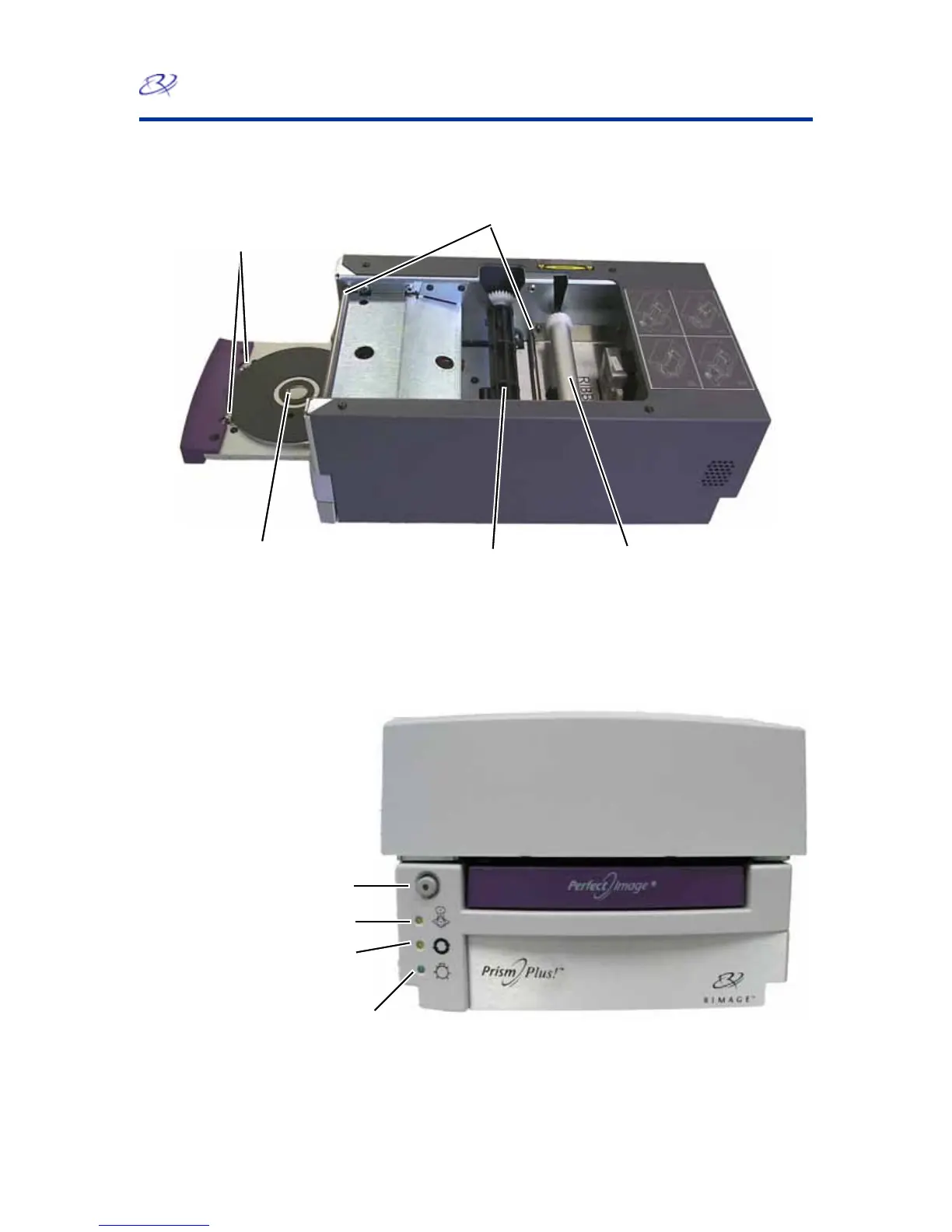
Identify the Parts of the Prism Printer
Front View
Ribbon Guides
Clamping Pins
Printer tray and
Centering Pin
Supply Roller
Take-u
p
Rolle
r
Control Panel
There are four indicator lights and an operator button on the operator panel located on the front of the
printer.
Operator button
with
indicator light
Disc Not Present
indicator light
Active indicator light
Power indicator light
Operator button
Press the operator button to open and close the printer tray. There is a yellow indicator light in the center of
this button.

Table of Contents

Other manuals for Rimage Prism

Related product manuals