Home
ring
Dash Cameras
4000
Page 14 (VIDEO MENU OPERATIONS)
ring 4000 - VIDEO MENU OPERATIONS; Video Playback Menu; Video Sub-menu Actions
132 pages
Manual
Save Page as PDF
To Next Page
To Next Page
To Previous Page
To Previous Page
Loading...
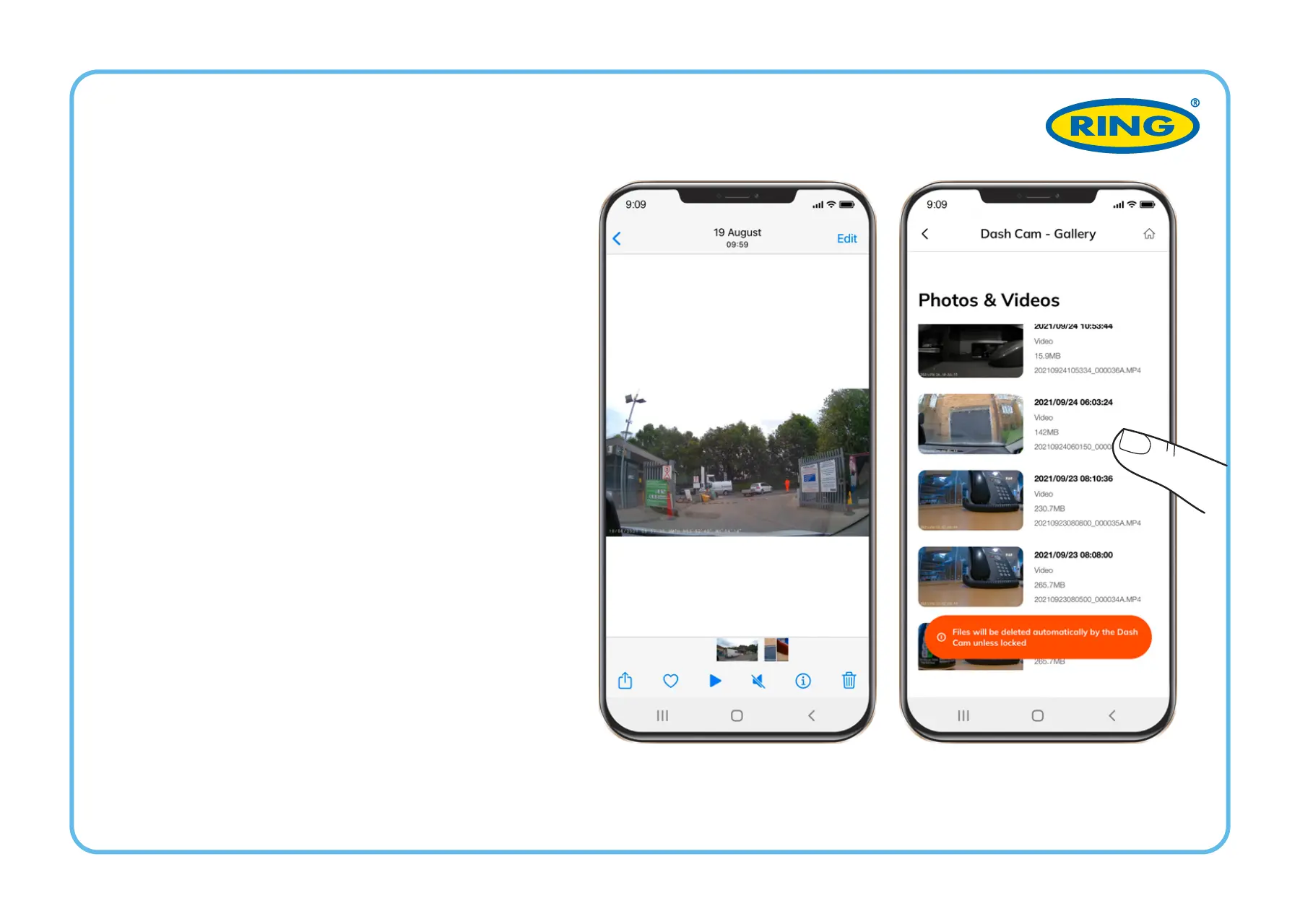
1
Shor
t
-pres
s each video fi
le once
t
o get i
nt
o the pla
yback men
u.
2
Press and hold eac
h video file
fo
r 3 seconds t
o acces
s the vi
d
-
eo
’
s
sub-menu. From th
ere, lock
,
do
wnloa
d, share, o
r delet
e the
select
ed video.
V
IDE
O
MENU
13
15
Table of Contents
Main Page
Before You Begin
3
Package Contents
4
INSTALLING Microsd CARD
7
Turning On/Off
8
Adjusting Viewing Angle
10
Menu Settings
11
Emergency Recording
12
Image Menu
15
Blurred Image
18
Power Requirements
21
Operating Temperatures
21
Vor dem Start
25
Aufnahme und Wiedergabe
35
Avant de Commencer
47
Contenu de L'emballage
48
INSTALLATION de la CARTE Microsd
51
Allumer / Éteindre
52
Paramètres Menu
55
Enregistrement D'urgence
56
Menu VIDéo
58
Menu Image
59
Caractéristiques
64
Antes de Comenzar
69
Contenido del Paquete
70
INSTALACIÓN de la TARJETA Microsd
73
Ajuste del Ángulo de Visión
76
Ajustes del Menú
77
Grabación de Emergencia
78
Menú de Vídeo
80
Menú de Imagen
81
Prima DI Iniziare
91
Contenuto Della Confezione
92
INSTALLAZIONE DELLA SCHEDA Microsd
95
Impostazioni Menu
99
Registrazione DI Emergenza
100
Menu Video
102
Menu Immagine
103
Requisiti DI Alimentazione
109
Voordat U Begint
113
Inhoud Van de Verpakking
114
Menu-Instellingen
121
Video Menu
124
Related product manuals
ring RSDCR1000
84 pages
ring RBGDC50
60 pages
ring Smart Dash Cam 3000
158 pages
ring RBGDC200
111 pages
ring RDC10
28 pages
ring RDC20
28 pages


 To Next Page