
 Need help?
Do you have a question about the ring Stick Up Cam Wired and is the answer not in the manual?
Get the Ring app to set up and manage your Stick Up Cam Wired. Download from app stores or visit ring.com/app.
You will need your Wi-Fi password for setup. Write it down for easy access during the installation process.
Learn the two ways to power your Stick Up Cam: USB or the included Ring PoE Adapter for indoor/outdoor use.
Instructions for feeding the USB cable through the cover and connecting it to the power supply and socket.
Details on connecting an Ethernet cable through the cover and using the PoE Adapter for power, including outdoor setup.
Guide to using the Ring app, selecting 'Set Up a Device', then 'Security Cams' to follow in-app instructions.
Explains that a flashing blue light indicates software updates and advises against unplugging the device.
Select a suitable indoor or outdoor spot for your Stick Up Cam, considering view and power/Ethernet access.
Route cables through the bottom cover, secure it, and place the camera in its chosen position on a flat surface.
Steps to remove covers, flip the base, and secure the camera to a wall using screws and the rubber pad.
Steps to remove cover, rotate the stand, and secure the camera to a ceiling using screws and the rubber pad.
Route cables through the bottom cover, slide and secure the cover with the attached screw for a finished installation.
Find Ring support contact information, including phone numbers for various regions and the official help website.
Details on customer support numbers, warranty, patents, and trademark information for Ring products.
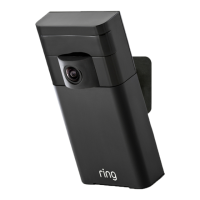
The Ring Stick Up Cam Wired is a versatile security camera designed for both indoor and outdoor surveillance, offering users the ability to monitor their property with ease. This device is part of Ring's ecosystem of smart home security products, allowing for integration and management through the Ring app. The camera's primary function is to provide live video feeds and record events, enhancing the security of your home or business.
One of the key usage features of the Stick Up Cam Wired is its flexible power options. Users can choose to power the camera via a standard USB connection, which is ideal for indoor installations where a power outlet is readily available. Alternatively, for outdoor use or situations requiring Power over Ethernet (PoE), the camera can be powered using the included Ring PoE Adapter. This adapter not only supplies power but also provides a stable network connection, which is particularly beneficial for outdoor installations where Wi-Fi signals might be weaker or less reliable. The manual explicitly advises installing the PoE Adapter indoors when the camera is used outdoors, with an Ethernet cable running to the camera. This ensures the adapter's protection from the elements while maintaining outdoor camera functionality.
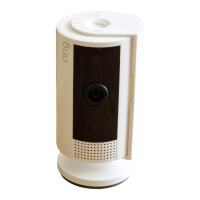
The physical installation of the Stick Up Cam Wired is designed to be adaptable to various environments. The camera comes ready to be placed on a flat surface, such as a table or shelf, making it convenient for quick indoor setups. For more permanent or specific viewing angles, the camera can be mounted on a wall or ceiling. The manual provides detailed instructions for each mounting option. When placing the camera on a table or shelf, users are instructed to route any connected cables through a hole in the bottom cover, then slide the cover into place and secure it with an attached screw using the provided star-shaped screwdriver bit. This ensures a neat and secure setup.
For wall mounting, the process involves removing a plastic cover and rubber pad from the base, flipping the hinged base down and behind the camera, and then pushing the rubber pad back into the base. The rubber pad serves to sit between the wall and the camera's base, providing a secure fit. The round part of the base is then held against the wall, rubber-side down, and mounted with included screws. An integrated level helps ensure the camera is installed straight.
Ceiling mounting follows a similar initial step of removing the plastic cover from the base. A crucial step for ceiling mounting is to rotate the entire stand 180 degrees on its axis so that the base is positioned above the camera. This reorientation allows the camera to hang correctly from the ceiling. Similar to wall mounting, the round part of the base is held against the ceiling, rubber-side down, and secured with the included screws. After either wall or ceiling mounting, the final steps involve routing any connected cables through the hole in the bottom cover, sliding the cover into place, and securing it with the attached screw using the star-shaped screwdriver bit. Finally, the plastic cover is snapped back onto the base and secured with a security screw, completing the installation.
A significant usage feature is the camera's integration with the Ring app. The app is essential for setting up and managing the Stick Up Cam Wired. Users need to download the Ring app from their respective app stores (Apple App Store or Google Play) or visit ring.com/app. Within the app, users select "Set Up a Device," then "Security Cams," and follow the in-app instructions to complete the setup process. Once set up, the "Live View" button in the Ring app allows users to see live video from their Stick Up Cam, providing real-time monitoring capabilities.
In terms of maintenance features, the manual highlights an important aspect related to software updates. If the blue light on the front of the Stick Up Cam flashes after setup, it indicates that the camera is updating its software. During this process, it is crucial not to unplug the Stick Up Cam, as interrupting a software update can potentially damage the device or lead to malfunctions. This is a key piece of information for users to ensure the longevity and proper functioning of their camera.
The Ring Stick Up Cam Wired is designed to be user-friendly, with clear instructions for setup and installation. Its adaptability in terms of power supply and mounting options makes it a versatile choice for various security needs. The reliance on the Ring app for management centralizes control and enhances the user experience, while the emphasis on proper handling during software updates underscores the importance of simple maintenance practices. The camera aims to provide reliable surveillance, keeping users connected to their property with its live video capabilities and flexible installation.
 General
| Type | IP security camera |
|---|---|
| Placement supported | Indoor & outdoor |
| Connectivity technology | Wired & Wireless |
| Bluetooth | - |
| Ethernet LAN | Yes |
| Wi-Fi standards | 802.11a, 802.11b, 802.11g, Wi-Fi 4 (802.11n) |
| Ethernet LAN (RJ-45) ports | 1 |
| Power source type | AC, PoE |
| Total megapixels | - MP |
| Maximum resolution | - pixels |
| Supported video modes | 1080p |
| Cables included | LAN (RJ-45), Micro-USB |
| Minimum illumination | - lx |
| Audio system | 2-way |
| Operating temperature (T-T) | -20.5 - 48.5 °C |
| Form factor | Box |
| Mounting type | Ceiling/Wall/Desk |
| Product color | Black |
| Mobile operating systems supported | Android, iOS |
| Harmonized System (HS) code | 85258900 |
 Weight and Dimensions
| Width | 60 mm |
|---|---|
| Height | 97 mm |




 To Next Page