62 KBP Series Manual
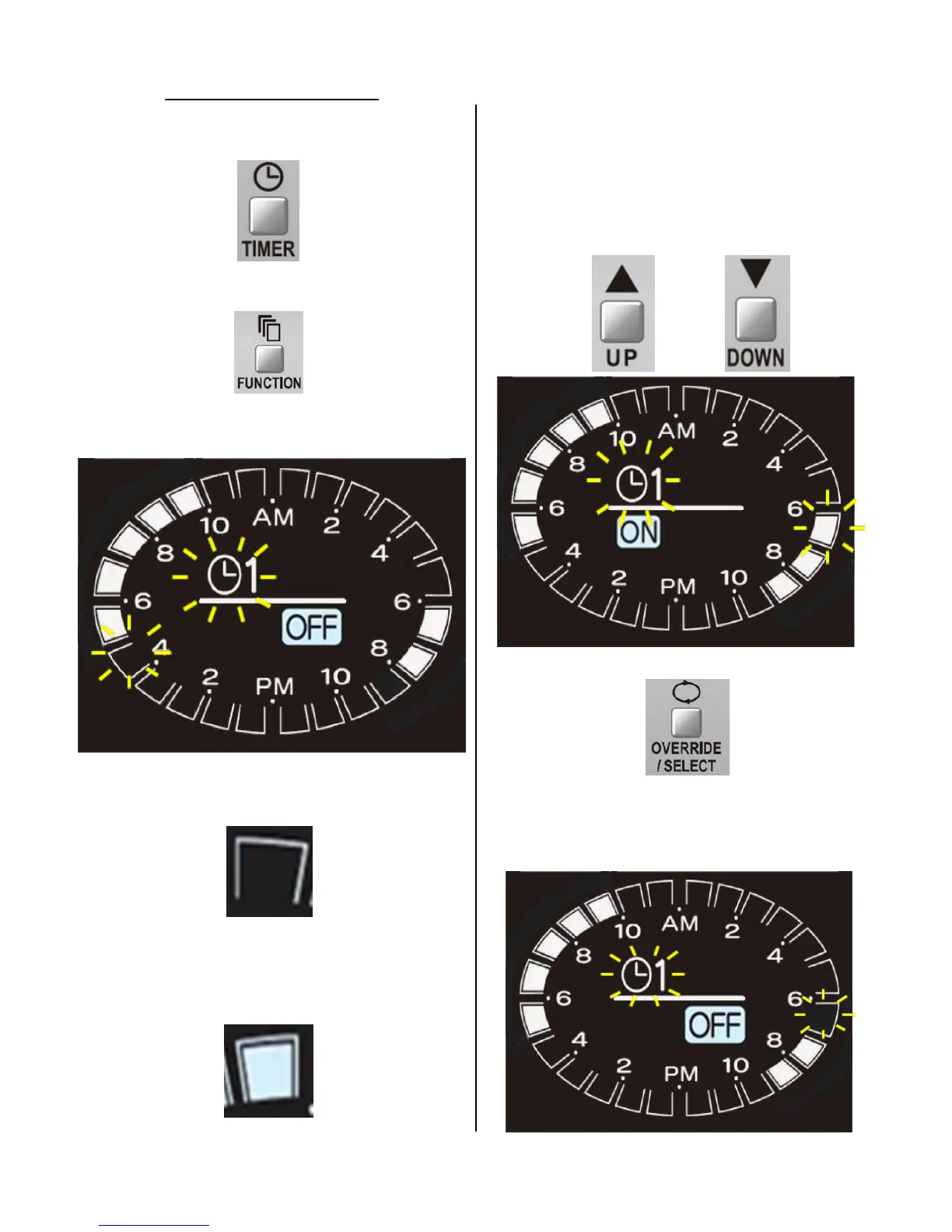
1. With the controller “ON”, press the “TIMER”
buon to display the sengs for “TIMER 1”.
2. Press the “FUNCTION” buon.
(The following example demonstrates seng “TIMER
1” to acvate the pump from 7 AM-9 AM instead of
6 AM-8 AM)
The “TIMER 1” icon and grid of the current me
will ash.
When the ashing grid is illuminated the pump
programming will be acve at that me frame.
“ON” will be displayed under the “TIMER 1” icon.
When the ashing grid is blank the pump
programming will be inacve at that me frame.
“OFF” will be displayed under the “TIMER 1” icon.
3. Use the “UP” or “DOWN” buon to select the me
frame (6:00 AM-7:00AM) to be adjusted.
Press “UP” to move the grid clockwise.
Press “DOWN” to move the grid counter-clockwise.
4. Press the “OVERRIDE/SELECT” buon.
”ON” icon will turn to the “OFF” icon.
The grid from 6:00AM-7:00AM will no longer be
lit.
Adjusng Timer Sengs



 To Next Page
 Loading...