64 KBP Series Manual
Be sure prior to using the mer that the clock me is correct. Unless the clock is set, the mer seng will not be
accessible.
1. Ensure the controller is “ON”
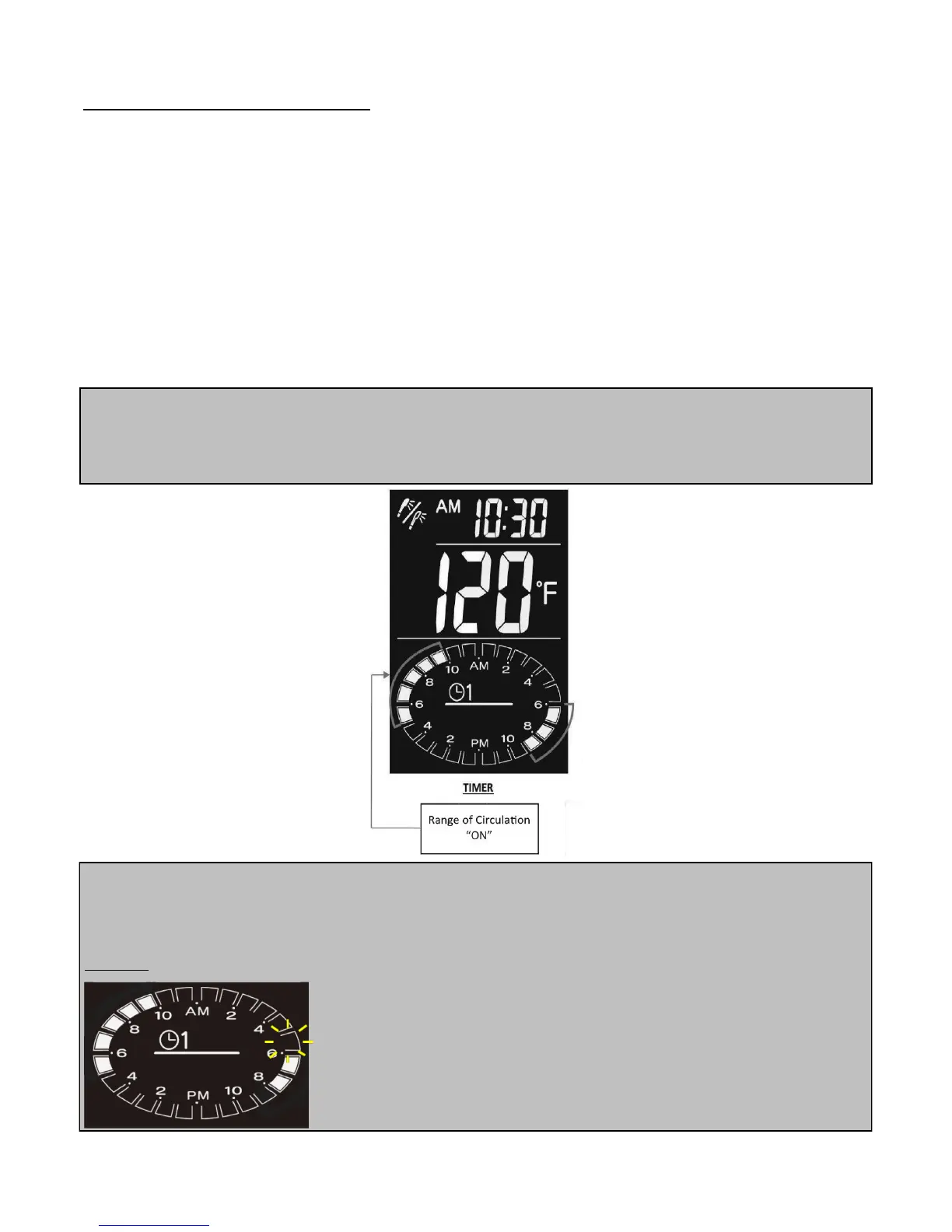
2. Press the “TIMER” buon. “TIMER 1” will be displayed. Timer 1 will be preset for 6AM-9AM and 5PM-10PM.
The range that is programmed will be lled in “white”. Each “white” secon represents 1 hour. When the
me is in the range that is programmed, the circulaon funcon will start automacally showing the
circulaon icon. When the programmed range comes to an end, the circulaon funcon will stop
automacally and the circulaon icon will no longer be shown.
3. Press the “TIMER” buon once more to show “TIMER 2”. (The preset is the same as “TIMER 1”)
4. Press the “TIMER” buon once more to exit from mer seng and the mer seng display will no longer be
shown.
NOTE
The user can alternate between mers by simply pressing the “TIMER” buon once the programming
has already been completed and exited
NOTE
When using the “TIMER” funcon, the user may want to consider seng the program to be acvated on the grid
icon block before the desired me water is needed to ensure hot water at the desired me
Example:
If hot water is desired for 6AM, the program can be set for 5AM to ensure that
at 6AM the water is already at the desired temperature.
Circulaon Funcon (with mer)



 To Next Page
 Loading...