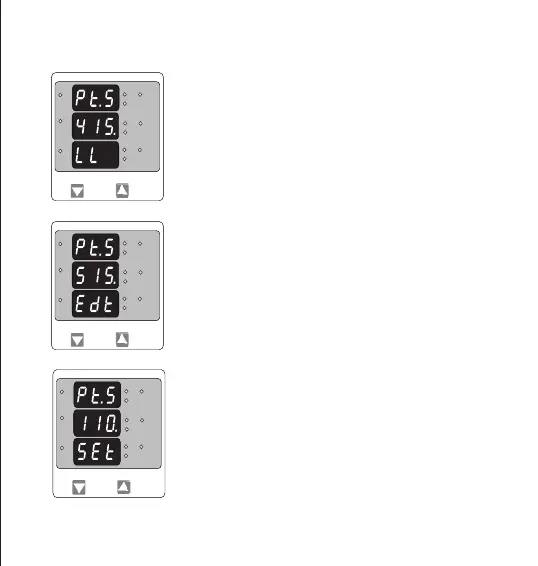
PT Secondary value conrmation.
This screen will only appears following an edit of PT secondary value.
If secondary value shown is not correct, pressing the “DOWN” key will
return to PT secondary edit stage.
Pressing “UP” key sets the displayed value and will advance to CT
Secondary Value Edit menu. (See section 3.2.5)
This screen is used to set the secondary value for Potential Transformer
Secondary value from 100V to 500VL-L.
Pressing “UP” key accepts the present value and then advances to
Current Transformer Secondary value edit mode.
Pressing the “DOWN” key will enter the PT secondary value edit mode.
* Denotes that Decimal Point will be ashing.
3.2.4. Potential Transformer Secondary Value
Potential Transformer secondary value Edit
Pressing “DOWN” Key advances the Most Signicant Digit To scroll from
1 through 5 .Pressing “UP” Key shifts the Decimal Position to right.
When value of least signicant Digit is set, Pressing of “UP” key
advances the screen to “PT secondary value Conrmation” screen.
L3-L1
L2-L3
Hz
x1000
L1-L2
Volt
x1000
L3
L1
L2
A
x1000
*
L3-L1
L2-L3
Hz
x1000
L1-L2
Volt
x1000
L3
L1
L2
A
x1000
L3-L1
L2-L3
Hz
x1000
L1-L2
Volt
x1000
L3
L1
L2
A
x1000
12


 To Next Page