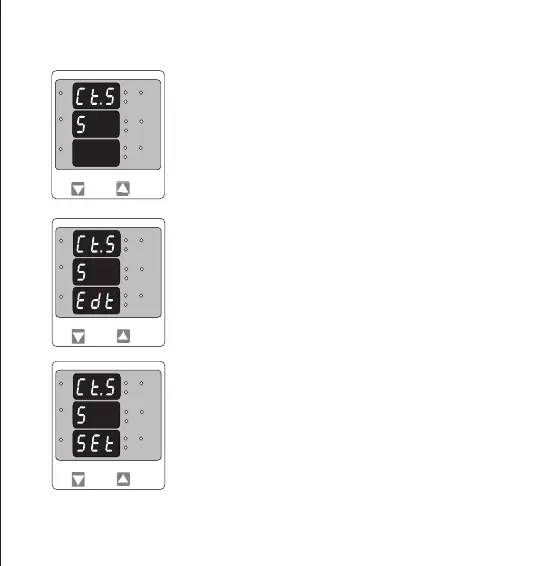
CT Secondary value conrmation.
This screen will only appears following an edit of CT secondary value.
If secondary value shown is not correct, pressing the “DOWN” key will
return to CT secondary edit stage.
Pressing “UP” key sets the displayed value and will advance RESET
menu (See section 3.2.5)
This screen is used to set the secondary value for Current Transformer
Secondary value from 1 and 5 Amperes.
Pressing “UP” key accepts the present value and then advances to
RESET menu..
Pressing the “DOWN” key will enter the CT secondary value edit mode.
3.2.5. Current Transformer Secondary Value
Current Transformer secondary value Edit
Pressing “DOWN” key scroll the value between 1 and 5.
Pressing “UP” key will enter the CT Secondary Value
Confirmation menu.
*
L3-L1
L2-L3
Hz
x1000
L1-L2
Volt
x1000
L3
L1
L2
A
x1000
*
L3-L1
L2-L3
Hz
x1000
L1-L2
Volt
x1000
L3
L1
L2
A
x1000
L3-L1
L2-L3
Hz
x1000
L1-L2
Volt
x1000
L3
L1
L2
A
x1000
13


 To Next Page