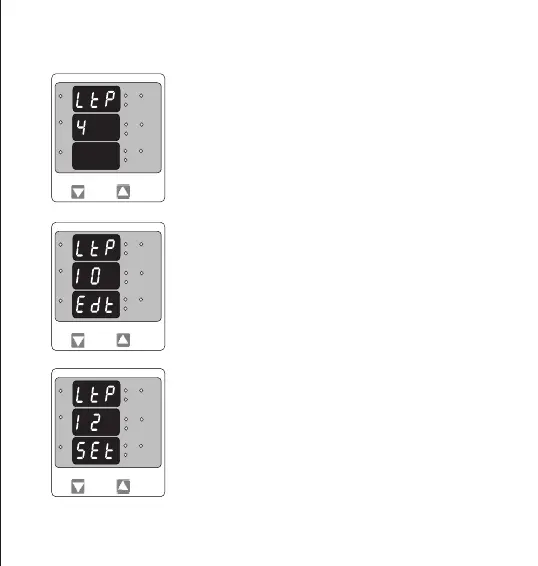
Trip parameter conrmation screen.
This screen will appear only after parameter edit.
Pressing “DOWN” key will re-enter the parameter selection menu.
Pressing “UP” key will set the parameter for relay trip and then it will
enter the trip point selection menu.
This screen enables user to select Parameter for limit monitoring via a
Relay.
Pressing “UP” key selects the displayed parameter for monitoring and
enters trip point selection screen.
Pressing “DOWN” key enters Trip parameter edit screen.
3.2.9 Relay Limit Parameter selection (Optional)
Trip parameter edit screen
Pressing “DOWN” key scrolls the parameters one by one as per table 2.
Selecting 00(None) disables relay function.
Pressing “UP” key selects the parameter and enters the Trip parameter
conrmation screen.In this case displayed number 10 will select VL1-L2
For relay monitoring as per table 2.
L3-L1
L2-L3
Hz
x1000
L1-L2
Volt
x1000
L3
L1
L2
A
x1000
L3-L1
L2-L3
Hz
x1000
L1-L2
Volt
x1000
L3
L1
L2
A
x1000
L3-L1
L2-L3
Hz
x1000
L1-L2
Volt
x1000
L3
L1
L2
A
x1000
17


 To Next Page