PT ratios, the values displayed represent the voltage.
Pressing the “UP” key accepts the present value and advances to the
“Current Transformer Primary value Edit” menu. (See Section 3.2.3)
Pressing the “DOWN” key will enter the “Potential transformer Primary
value edit mode.
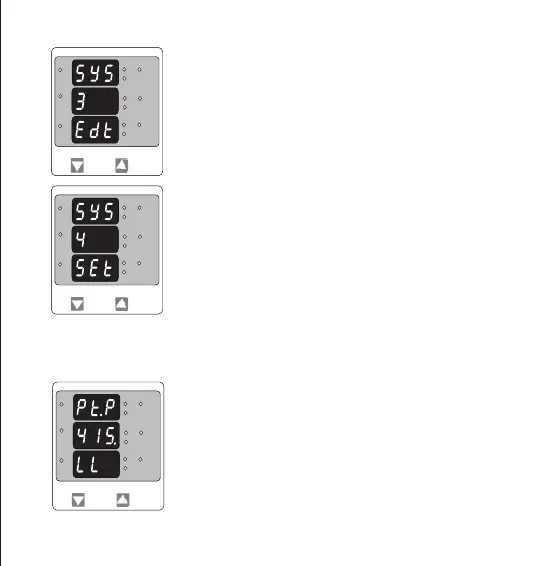
System Type Edit
This screen appears only if “DOWN” key is pressed in previous Menu.
Pressing “DOWN” scrolls through the values available.
Pressing “UP” Key advances to the system type Conrmation menu.
3.2.2. Potential Transformer Primary Value
System Type Conrmation
This screen will only appear following the edit of system type.
Pressing the “UP” key set the displayed value as system Type and will
advance to “Potential Transformer Primary Value Edit” menu. (See
section 3.2.2)
The nominal full scale voltage which will be displayed as the Line to Line voltage for all system types.
This screen enables the user to display Line to Line and Line to neutral Voltages inclusive of any
L3-L1
L2-L3
Hz
x1000
L1-L2
Volt
x1000
L3
L1
L2
A
x1000
L3-L1
L2-L3
Hz
x1000
L1-L2
Volt
x1000
L3
L1
L2
A
x1000
L3-L1
L2-L3
Hz
x1000
L1-L2
Volt
x1000
L3
L1
L2
A
x1000
9


 To Next Page