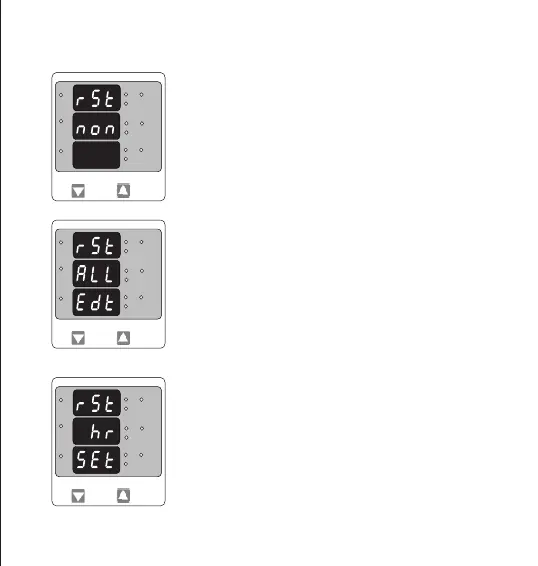
Conrmation of parameter for RESET
Pressing “DOWN” will enter reset menu back and scroll etween
parameters as above.
Pressing “UP” key will Reset the Selected Parameter. In this case hour
parameters will get reset.Then it will enter to auto scrolling or xed
screen selection parameter.
The following screens allow the users to reset the run hour, ON Hour, No.
Of Interruptions, Min and Max. Values of Voltage and Current.
Pressing the “DOWN” key will enter the “Reset edit” menu.
Pressing the “UP” key will Reset None and enter to screen Auto of xed
selection menu.
3.2.6. Reset
Edit the Reset of Parameters
Pressing “DOWN” will scroll the parameters in sequence as Follow :
1. All : To reset All parameters, 2. Hi : To reset Max values,
3. Lo : To reset min. Values, 4. Hr : To reset Run Hrs, On Hrs,
5. Int : To reset No. Of Interruptions,
6. None : No to reset any of the Parameters,
Select the Correct parameter to Reset and then Press “UP” key. This will
enter to Reset Parameter Conrmation Screen.
L3-L1
L2-L3
Hz
x1000
L1-L2
Volt
x1000
L3
L1
L2
A
x1000
L3-L1
L2-L3
Hz
x1000
L1-L2
Volt
x1000
L3
L1
L2
A
x1000
L3-L1
L2-L3
Hz
x1000
L1-L2
Volt
x1000
L3
L1
L2
A
x1000
14


 To Next Page