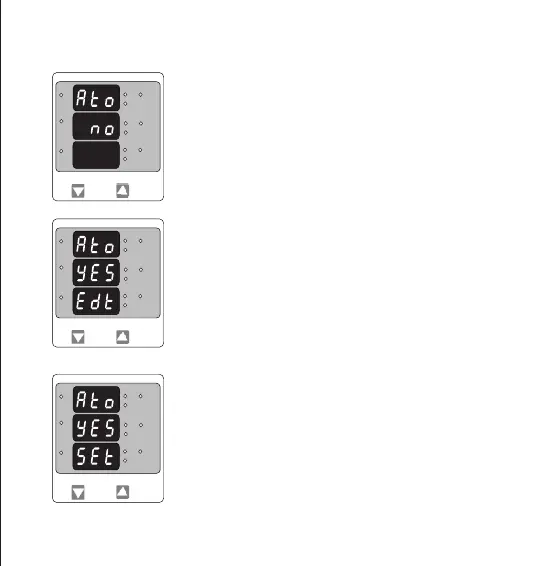
Conrmation of Auto Scrolling / Fixed Screen
Pressing “DOWN” key enter back to edit menu.
Pressing “UP” key conrms the selection and enters Number of poles
selection menu.
This menu allow to select scrolling or xed screen.
Pressing “UP” key enters conrmation of Fixed Screen.
Pressing of “DOWN” key enters to Edit menu.
Fixed Screen / Auto Scrolling Edit.
Pressing of “DOWN” key Rolls between “Yes” and “No”.
Pressing “UP” key enters Auto scrolling / xed screen select conrmation.
3.2.7 Screen Auto scrolling / Fixed Screen selection
L3-L1
L2-L3
Hz
x1000
L1-L2
Volt
x1000
L3
L1
L2
A
x1000
L3-L1
L2-L3
Hz
x1000
L1-L2
Volt
x1000
L3
L1
L2
A
x1000
L3-L1
L2-L3
Hz
x1000
L1-L2
Volt
x1000
L3
L1
L2
A
x1000
15


 To Next Page