66
The screens displayed vary depending on what optional equipment has been connected and how you have completed settings.
Some items may not be displayed, depending on how the administrator has congured the settings. For details, ask your
administrator.
•
•
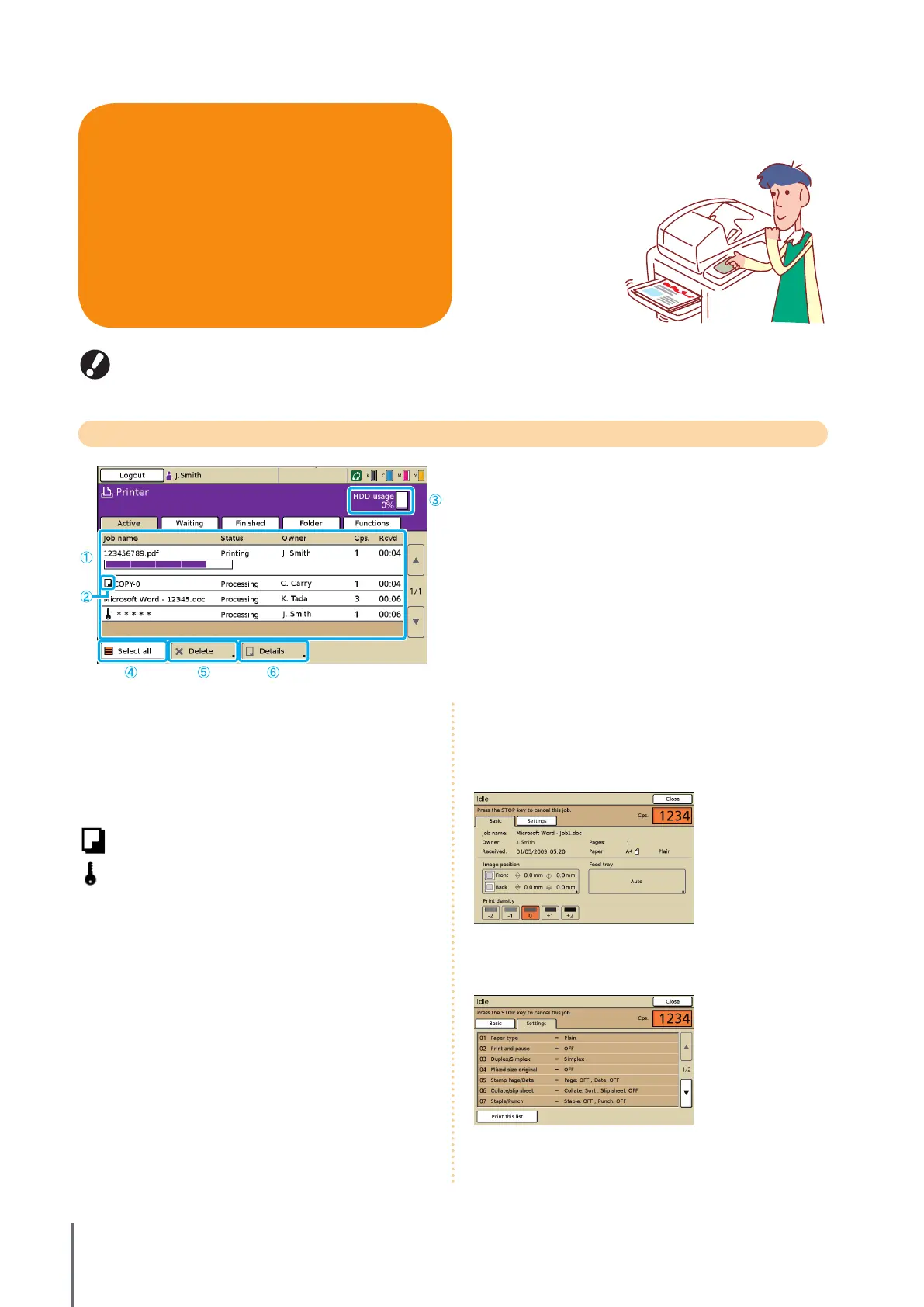
Active Screen
Lists active and idle jobs.
① Job list
Check the job name, status, owner name, and other details.
The job currently being processed is listed rst. Jobs shown
here will be processed in the order they are listed.
② Job icon
Indicates the job type. Located to the left of a job name.
Copy job
PIN code job
③ HDD usage
Indicates how much of the hard disk drive is used.
④ [Select all]
Press to select all listed jobs.
⑤ [Delete]
Delete the selected job.
⑥ [Details]
Check or modify settings of selected jobs.
Basic Screen
Check paper or print settings, as needed.
Settings Screen
Check the current settings, as needed.
[Print this list]
Print the listed settings information.
●
●
You can print jobs, check job settings, and perform other
operations on printer mode screens. Jobs are grouped by
status and listed on the [Active], [Waiting],
[Finished], and [Folder] screens.
Printer Mode Screens
ComColor Series Basic Guide 02



 To Next Page