To Administrator
Canceling the Protect Setting
303
To Administrator
Canceling the Protect Setting
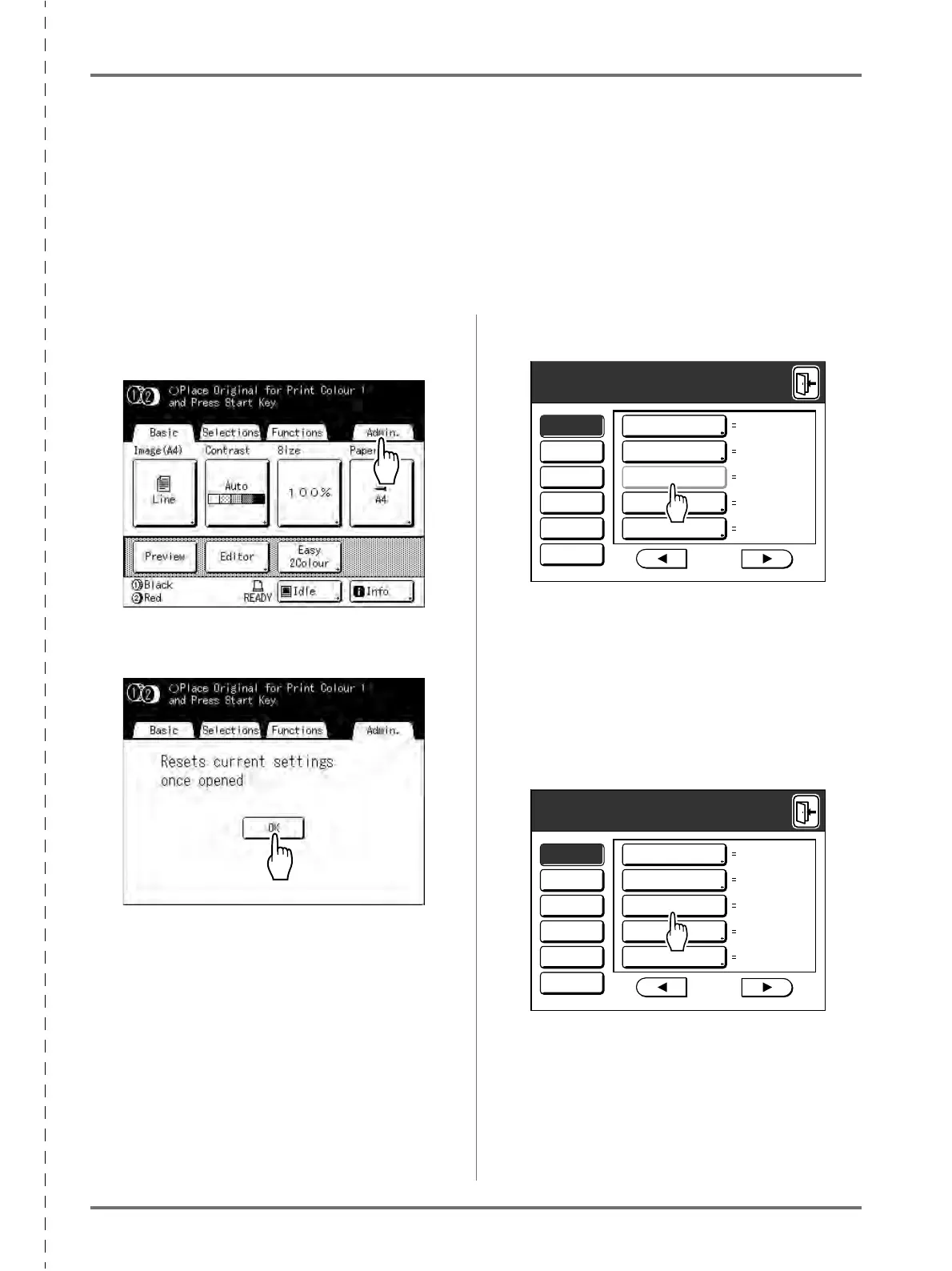
Cancellation of the “Protect” setting should be always done by the administrator.
Important!:
• To attach more importance to security, cut out this page, which should be stored by the administrator.
1
Touch [Admin.] on the Basic Screen
for each mode.
2
Touch [OK].
3
Touch greyed-out [Protect].
4
Remove the Master Disposal Box.
Remove either one of two Master Disposal Boxes.
)p.248
5
Touch [Protect] again after removing
the Master Disposal Box.
The “Protect” setting is cancelled.
After confirming that the display indicates
“OFF”
,
set the Master Disposal Box to the original posi-
tion.
12hour
OFF
ON
P
.7/10
OFF
5mnAll
Display
Default
System
Link Mode
Editor
Energy Saving Mode
Power-OFF Schedule
Protect
Auto Idling
Auto Page Renewal
Admin.
12hour
OFF
ON
P
.7/10
OFF
5mnAll
Display
Default
System
Link Mode
Editor
Energy Saving Mode
Power-OFF Schedule
Protect
Auto Idling
Auto Page Renewal
Admin.



 To Next Page