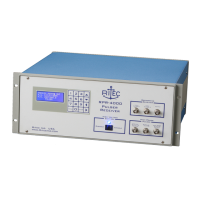
RPR-4000
Operations manual
REV 8-21 19
Page 3 – Receiver settings
Receiver Input: 1
Receiver Gain: 20dB
High Pass Filter: 200 KHz
Low Pass Filter: 12 MHz
Page 4 – Trigger Settings
Repetition Rate: 25 Hz
Trigger: INT
6. Turn on the high voltage using the rocker switch on the front panel. The LED on
the front panel above the switch should illuminate.
7. View the “RF Pulse Monitor” signal on the oscilloscope. You should see a burst
with a center frequency of 1 MHz and 5 μs wide. The amplitude will depend
upon your RPR-4000 model and the load impedance, but should be in the range of
100 V to 500 V peak to peak.
Verifying receiver functionality
The receiver functionality can be tested by using an external signal generator or function
generator. An oscilloscope will be required to view the receiver output signal.
1. Connect a coax cable from signal generator to “Input Number 1” on the front
panel. The signal should be 100mV peak to peak at a frequency of 1 MHz
2. Connect a coaxial cable from the connector labeled “Output” in the broad band
receiver area of the front panel to a 50 Ω terminated input on the oscilloscope.
Set the channel’s vertical sensitivity to 500 mV per division.
3. Set up the triggering for the external oscilloscope. If provided, use the trigger
output or synch output from the signal or function generator, otherwise trigger on
the receiver output signal itself.
4. Use the front panel keypad interface to enter the following settings:
Page 3 – Receiver settings
Receiver Input: 1
Receiver Gain: 20dB
High Pass Filter: 200 KHz
Low Pass Filter: 12 MHz
5. Set the time oscilloscope horizontal scale for 1 μs per division. Verify that the
oscilloscope is triggering.


 To Next Page