RPR-4000
Operations manual
REV 8-21 24
2 System Operation
This section provides a complete description of the instrument settings and adjustments
available to the user. These settings are accessed via the front panel console. For
information on controlling the instrument remotely, please see Section 3: Remote
Programming.
Front panel console
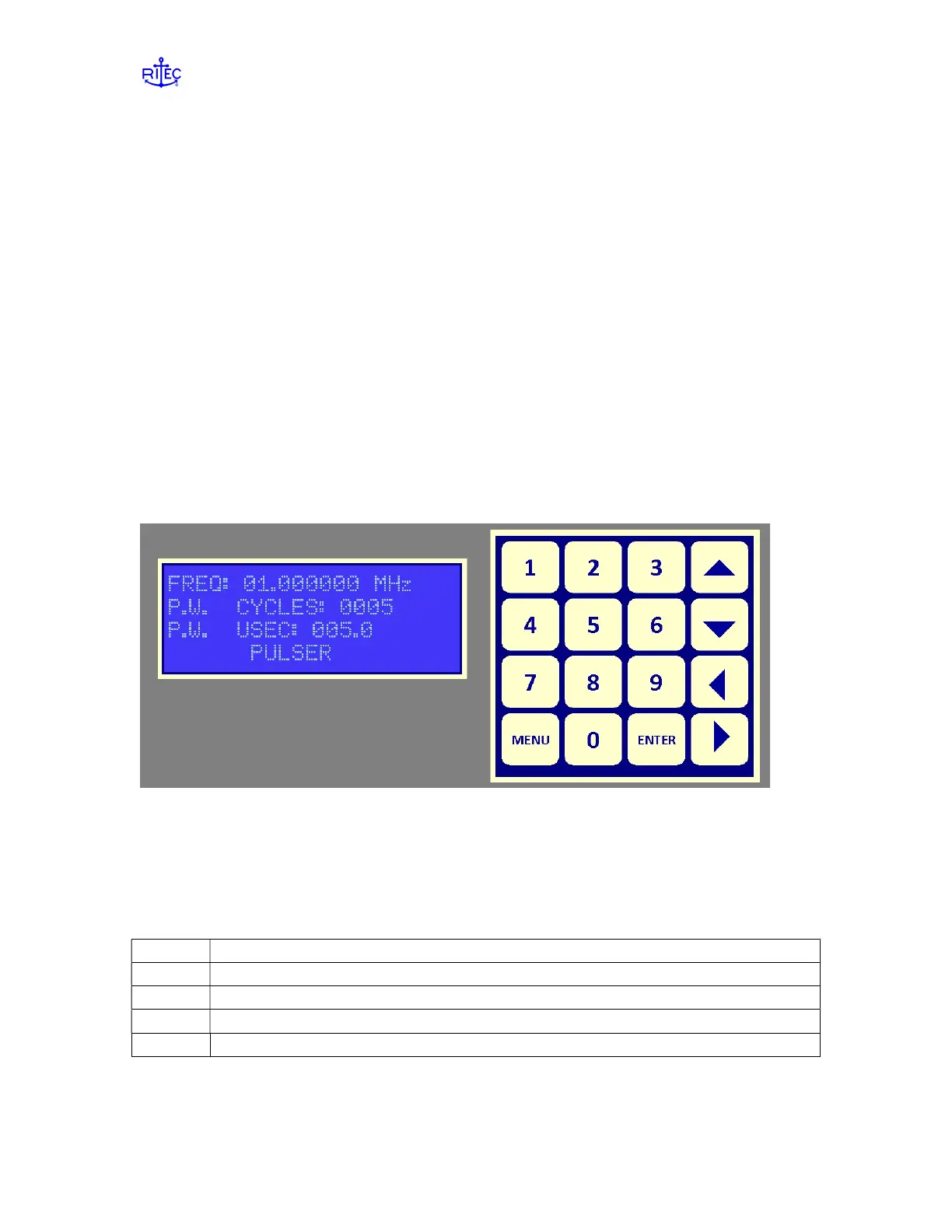
The operator’s console was designed to give the operator quick and easy access to system
parameter settings. The display is a 4 line by 20 character LCD display with LED
backlighting to provide a sharp, easy-to-read data presentation. Available keys include 0
thru 9 for entering numerical data, Up, Down, Left & Right arrow keys for changing
alpha data fields and selecting numerical data field character positions, the Enter key for
accepting the data field settings and the Menu key for selecting 1 of 5 menu pages. A
view of the keypad display is shown in Figure 2.1.
Figure 2.1: The keypad display console for manually controlling the RPR-4000.
Navigating the menu
Parameters for the pulser-receiver are stored in 5 pages. To cycle to the next page, press
the MENU key. Table 2.1 lists the Table of contents for the pages of the menu.
Table 2.1: Table of contents for the RPR-4000 control menu
Page Contents
1-2 Pulser settings – frequency, pulse width, output level control
3 Receiver settings – input channel, gain, filter selection
4 Trigger settings – trigger source and repetition rate
5 Program settings – loading and saving parameters
To cycle through the parameters on a page, press the enter key.


 To Next Page