38 RITTAL outdoor cooling unit assembly and operating instructions
6 Operation
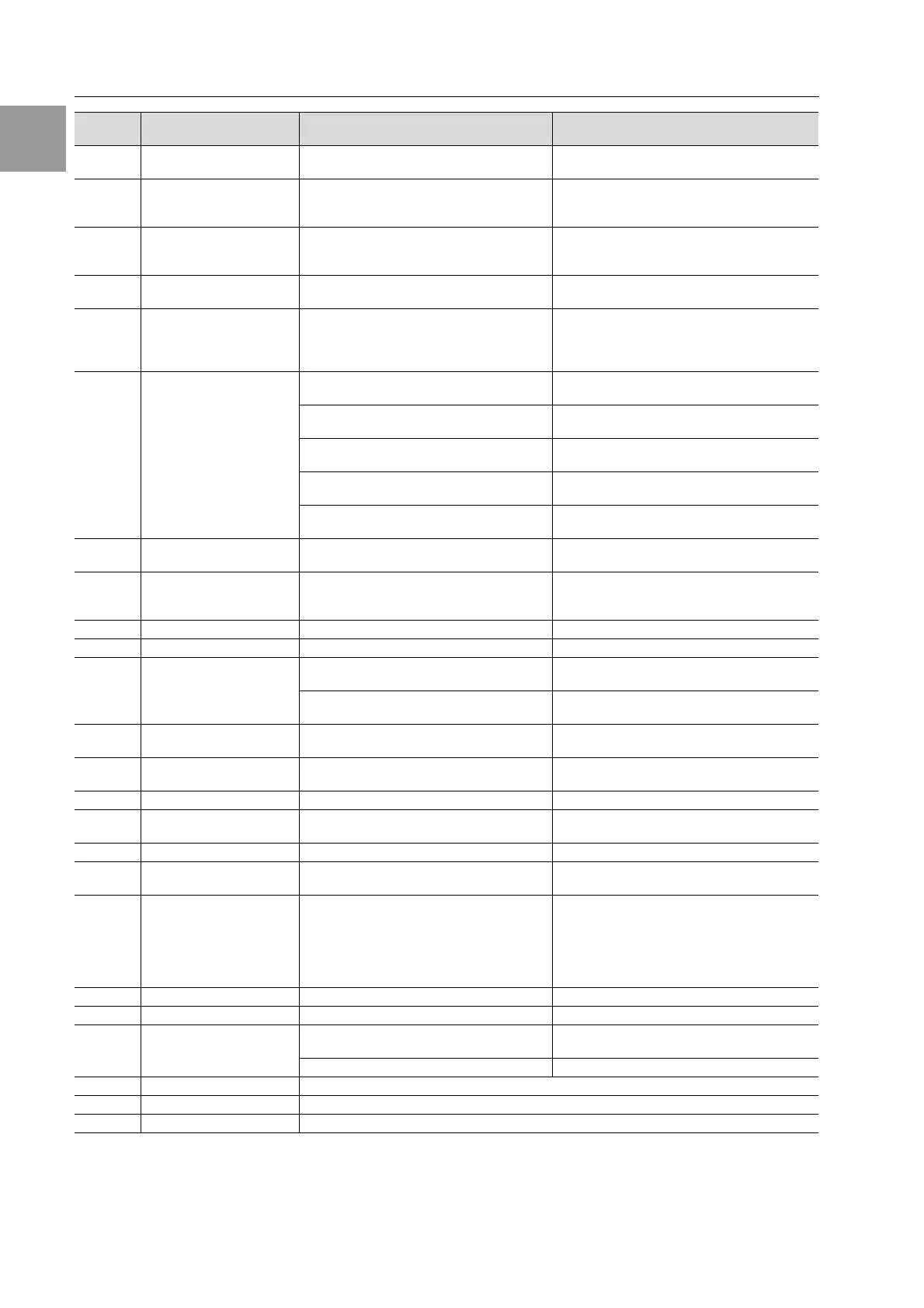
Tab. 4: Troubleshooting with the Comfort controller
Display
screen
System message Possible cause Measures to rectify the fault
A01 Enclosure door open Door open or door limit switch incorrectly
positioned
Close door, position door limit switch correctly,
check connection if necessary
A02 Enclosure internal
temperature too high
Cooling capacity inadequate/unit undersized.
Error as a consequence of messages A03 to
A17.
Check cooling capacity
A03 Filter monitoring Filter mat soiled Not relevant, as CS outdoor cooling units
do not have filter mats.
Reset the Comfort controller.
A04 Ambient temperature
too high/too low
Ambient temperature outside of admissible
operating range (+10°C to +60°C)
Not relevant for CS outdoor cooling units.
A05 Icing hazard Operational display in case of icing hazard.
Evaporator coil fan may be mechanically
blocked, defective, or cold air outlet
obstructed.
Set the enclosure internal temperature to
a higher value. Check the evaporator fan;
release or exchange if necessary.
A06 PSA
H
pressure-operated
switch
Ambient temperature too high Lower the ambient temperature;
reset the Comfort controller
Condenser soiled Clean the condenser;
reset the Comfort controller
Condenser fan defective Replace;
reset the Comfort controller
E-valve defective Have the sensor repaired by a refrigeration
engineer; reset the Comfort controller
PSA
H
pressure-operated switch defective Have the switch replaced by a refrigeration
engineer; reset the Comfort controller
A07 Evaporator coil Lack of coolant; sensor in front of or behind
condenser defective
Have the sensor repaired by a refrigeration
engineer; reset the Comfort controller
A08 Condensate warning.
Only in units with optional
condensate evaporation
Condensate discharge kinked or blocked Check condensate drainage; repair any kinks
or blockages in the hose
A09 Condenser fan Blocked or defective Clear the blockage; replace if necessary
A10 Evaporator fan Blocked or defective Clear the blockage; replace if necessary
A11 Compressor Compressor overloaded
(internal winding protection)
No action required;
unit switches back on automatically.
Defective
(check by measuring the winding resistance)
Have it replaced by a refrigeration engineer
A12 Condenser temperature
sensor
Open or short-circuit Replace
A13 Ambient temperature
sensor
Open or short-circuit Replace
A14 Icing temperature sensor Open or short-circuit Replace
A15 Condensate warning
temperature sensor
Open or short-circuit Replace
A16 Internal temperature sensor Open or short-circuit Replace
A17 Phase monitoring For three-phase devices only:
Incorrect rotary field/phase absent
Not relevant, as CS outdoor cooling units do not
have phase rotation.
A18 EPROM error New board obstructed Software update required (only after installing
a board with more recent software): Enter the
programming level with Code 22;
press button 1
and confirm with “Set” until “Acc”
appears. Next, disconnect the unit from the
mains and reconnect.
A19 LAN/Master-slave Master and slave not connected Check setting and/or cable
A20 Voltage drop Error display not shown Event is stored in the log file
E0 Display message Connection problem between the display
and the controller board
Reset: Switch power supply off, then switch on
again after approx. 2 sec.
Cable defective; connection loose Exchange the boards
OL Overload Ambient parameters or heat loss outside of the applicable limits.
LH Low heat Minimal heat loss inside the enclosure.
rSt Reset Manual device reset required, see “6.1.9 Resetting the Comfort controller”, page 39.



 To Next Page