Operating Instructions
Power Peak
®
C8 EQ-BID
No.
8553
6
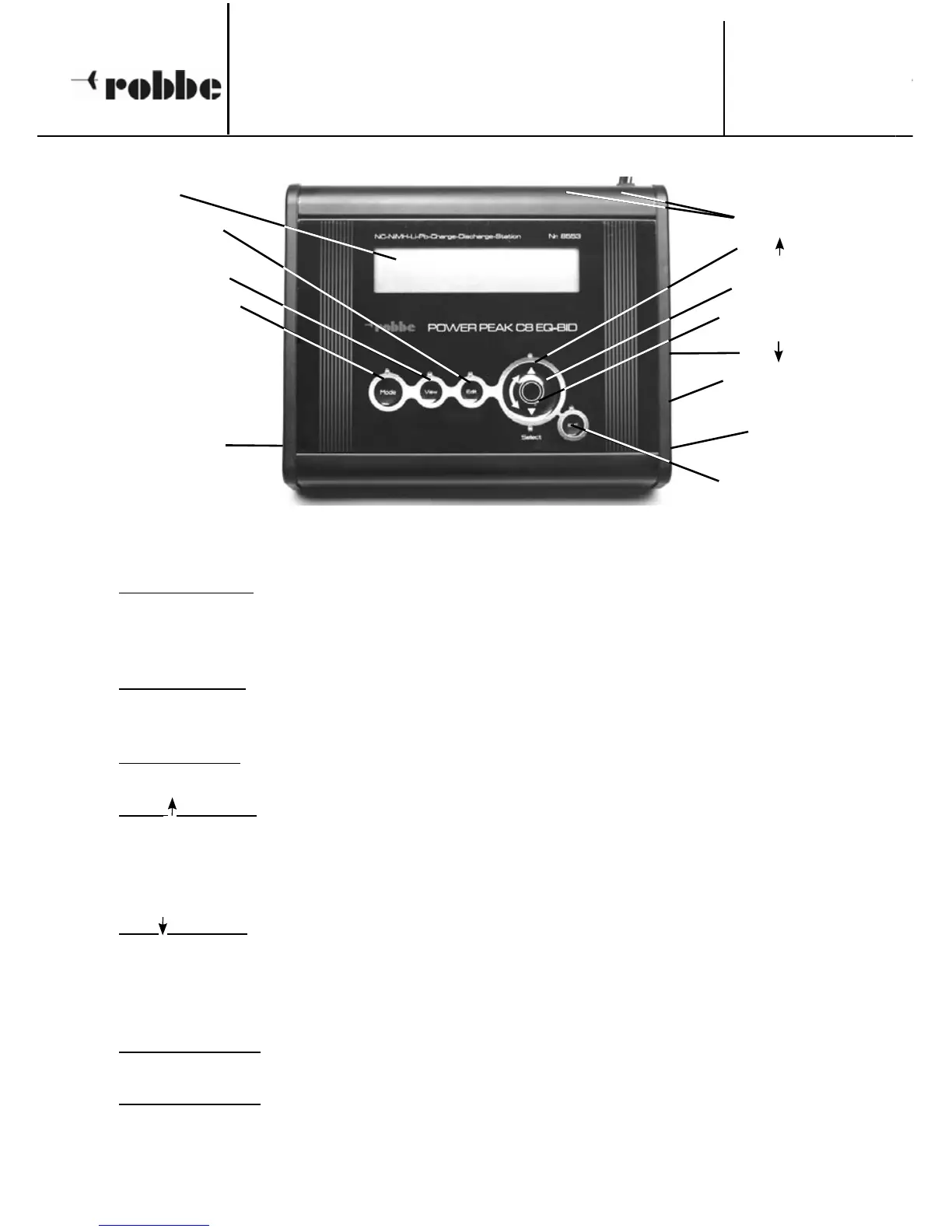
3.1 CONTROL FUNCTIONS
MODE BUTTON
• Press 1 x to start a charge process;
Press 2 x to start a discharge process;
Press 3 x to start a discharge / charge process (cycle charge).
VIEW BUTTON
• Displays the charger’s various parameters, e.g. input voltage. It is also possible to dis-
play all the individual cell voltages of a connected LiPo battery using this button.
EDIT BUTTON
• Pressing the “EDIT” button takes you to the battery parameter and set-up menu.
“+” /
BUTTON
• When adjusting a parameter (battery type, cell count, etc.) this button is used to incre-
ase the value by one increment; at the menu select stage it selects the next menu. The
button features an auto-repeat function: holding it pressed in has the same effect as
repeatedly pressing the button.
“-” /
BUTTON
• When adjusting a parameter (battery type, cell count, etc.) this button is used to decre-
ase the value by one increment; at the menu select stage it selects the previous menu.
The button features an auto-repeat function: holding it pressed in has the same effect
as repeatedly pressing the button.
SELECT WHEEL
• When rotated, the Select Wheel duplicates the “+” / “-” buttons.
ENTER BUTTON
• Pressing the ‘ENTER’ button confirms a selection – e.g. activating a selected sub-menu
– or adopts a previously set value.
3. CHARGER CONTROLS
Power supply
ENTER button
BID socket
USB socket
for updating
EDIT button
MODE button
“+” /
button
Battery sockets
VIEW button
Voltage sensor
socket
Select wheel
“-” /
button
Screen




 To Next Page