Telemetry-Box 2.4 GHz FASSTest
®
6
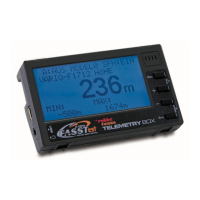
Toswitchtheuniton,themicro-switchonthebackofthe
unit must be moved up to the "ON" position.
When switched on, the screen displays the software versi-
on number and the actual Telemetry-Box voltage.
7. SWITCHING THE TELEMETRY-BOX ON 8. CHARGING THE TELEMETRY-BOX
The Telemetry-Box is fitted with an internal 3.7 V / 500
mAh LiPo battery. The Telemetry-Box battery can be char-
ged from any PC or USB charger using the mini-USB lead.
If you wish to charge the Telemetry-Box "on the road", use
a USB adapter for your car's cigarette lighter; USB adap-
ters for domestic use are also available. Use only a USB
charger rated at 5 V / 1 A.
Note:
When the Telemetry-Box is connected to a PC, you may
see a window in which you are requested to install the soft-
ware driver for the Telemetry-Box. However, this driver is
only needed if you wish to update the software, i.e. you
can ignore this message if you only wish to charge the
Telemetry-Box.
Safety Note:
The Telemetry-Box switches itself off automatically when
the battery voltage falls to 3.3 V. If this should happen, you
must still switch the Telemetry-Box off using the switch on
thebackoftheunit.
Pleasecheckthebatteryvoltagebeforeeveryight.
On / Off switch


 To Next Page