49
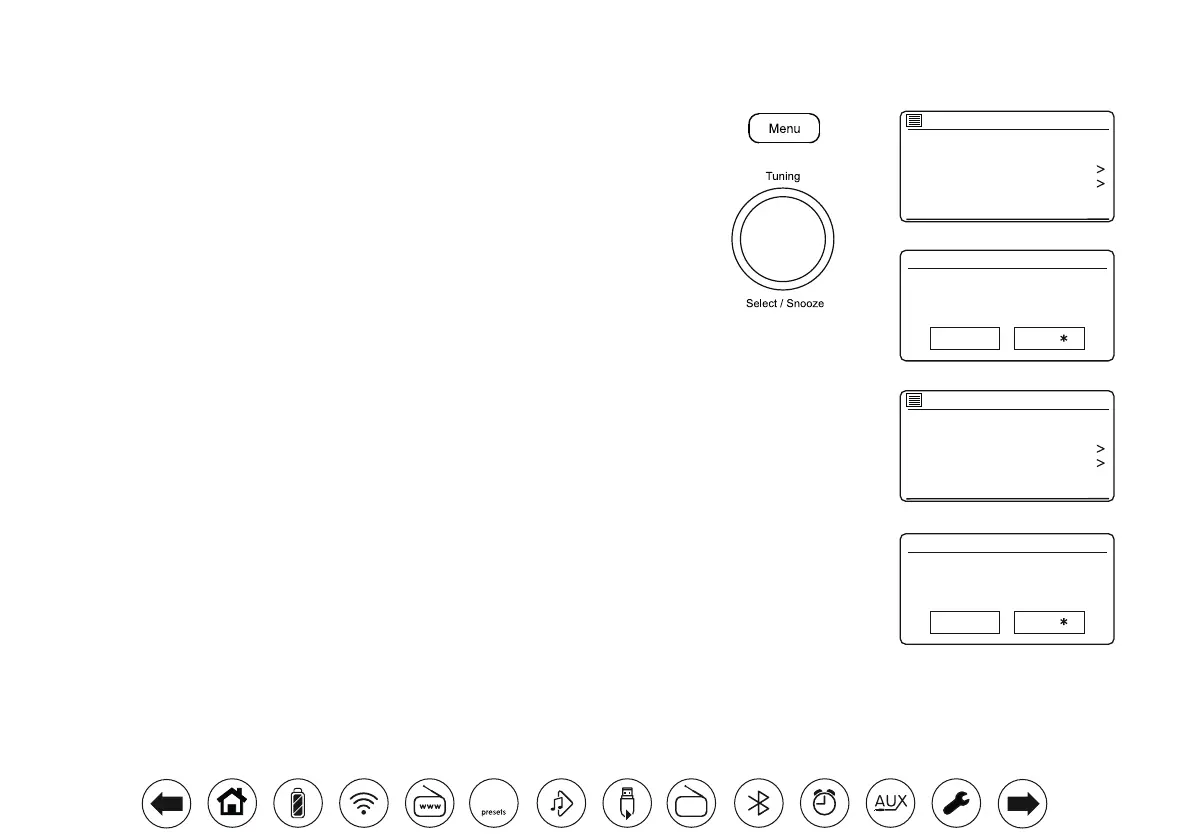
Scan setting
Audio setting
System settings
Main menu
FM
FM station scan
Strong stations only?
YES NO
Scan setting
Audio setting
System settings
Main menu
FM
FM weak reception
Listen in Mono only?
YES NO
Scansensitivitysetting-FM
Your radio will normally scan for FM broadcasts which are strong enough to give
good reception. However, you may wish the Auto-scan function to also be able to nd
weaker signals, possibly from more distant radio transmitters. Your radio includes a
local / distant option for the Auto-scan function.
1. When in FM mode, press Menu.
2. Choose 'Scan setting'.
3. To set your radio so that only the stations with the strongest signals are found during
scanning choose 'YES'. (Normally this will restrict scanning to local transmissions).
4. Alternatively, to set your radio so that all available stations are found during scanning
(local and distant transmissions) choose 'NO'.
Note: The initial setting (out of the box, or after a System Reset) causes the radio
to ignore weaker (or more distant) signals.
Stereo/Monoswitching-FM(headphonesandlineoutputonly)
Your radio will play stereo FM broadcasts in stereo (headphones and line output only)
provided that the received signal is of adequate strength. However, as a stereo signal
becomes weaker the audio signal will become poorer.
It may be preferable to force the radio to play the station in mono in order to reduce
the level of background hiss.
1. Ensure your radio is in FM mode and tune to the required FM station.
2. To change the audio setting, press Menu.
3. Choose 'Audio setting'. The current audio setting is indicated with an asterisk. To
switch to mono in order to reduce the hiss from a weak FM signal choose 'YES'
or choose 'NO' to return to the normal automatic 'stereo or mono' setting.
DAB
30



 To Next Page