If you need any further advice, please call our Technical Helpline on :-
020 8758 0338 (Mon-Fri)
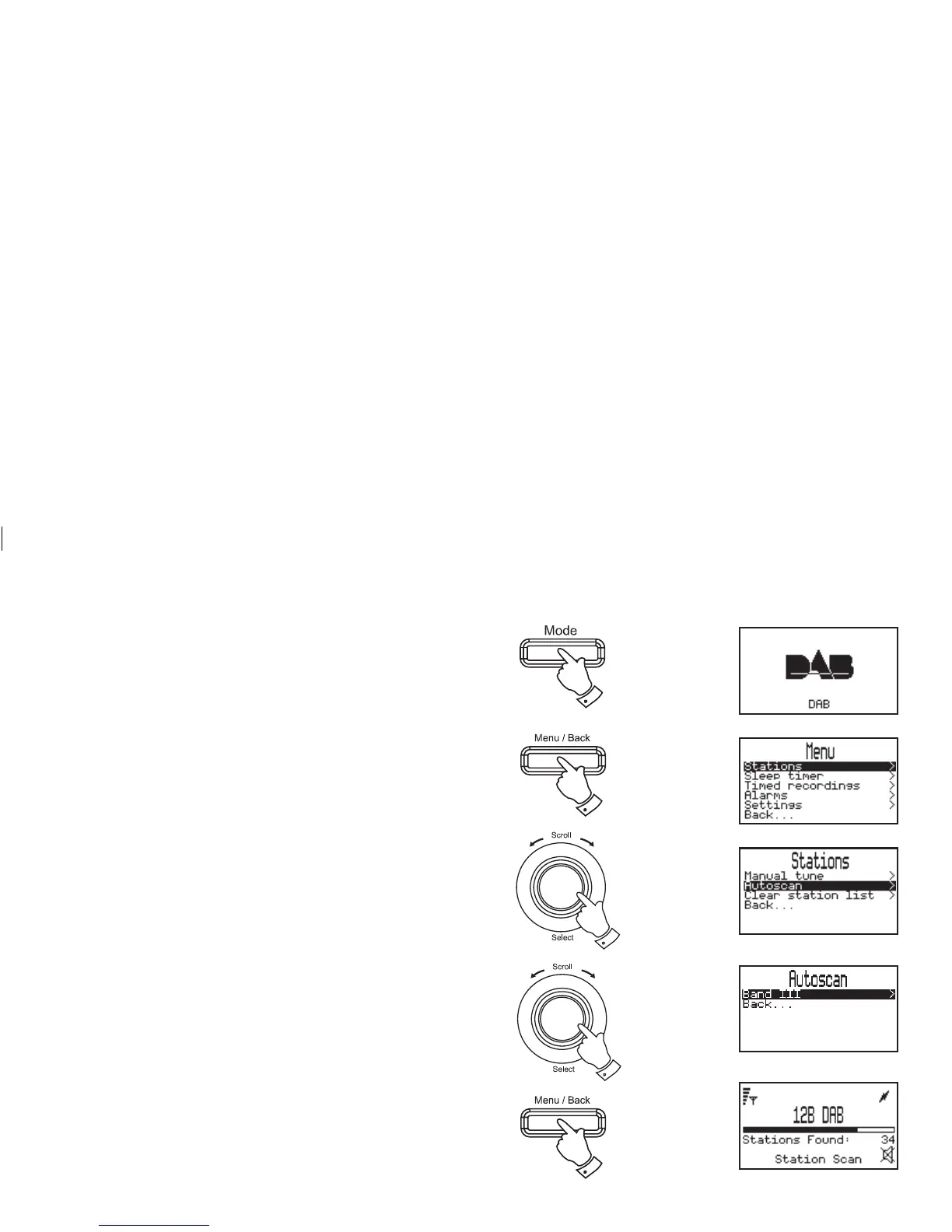
Finding new stations - DAB
As time passes new stations may become available. To fi nd new stations
proceed as follows:-
1. Press the Mode button until the DAB mode is selected.
2. Press the Menu/Back button to enter the main DAB menu.
3. Rotate the Tuning/Select control until "Stations" is highlighted on
the display. Press and release the Tuning/Select control and
the stations menu will appear on the display.
4. Rotate the Tuning/Select control until "Autoscan" is highlighted
on the display. Press and release theTuning/Select control.
5. Rotate the Tuning/Select control until "Band III" is highlighted
on the display. Press and release the Tuning/Select control.
6. Your radio will carry out a scan of the entire band III UK frequencies.
"Station Scan" will appear on the display. A progress bar will be
shown on the display indicating autotune progress and number
of stations found.
7. The scan can be cancelled at any time by pressing the Menu/Back
button.
3,4
1
5
2
7
10














 To Next Page