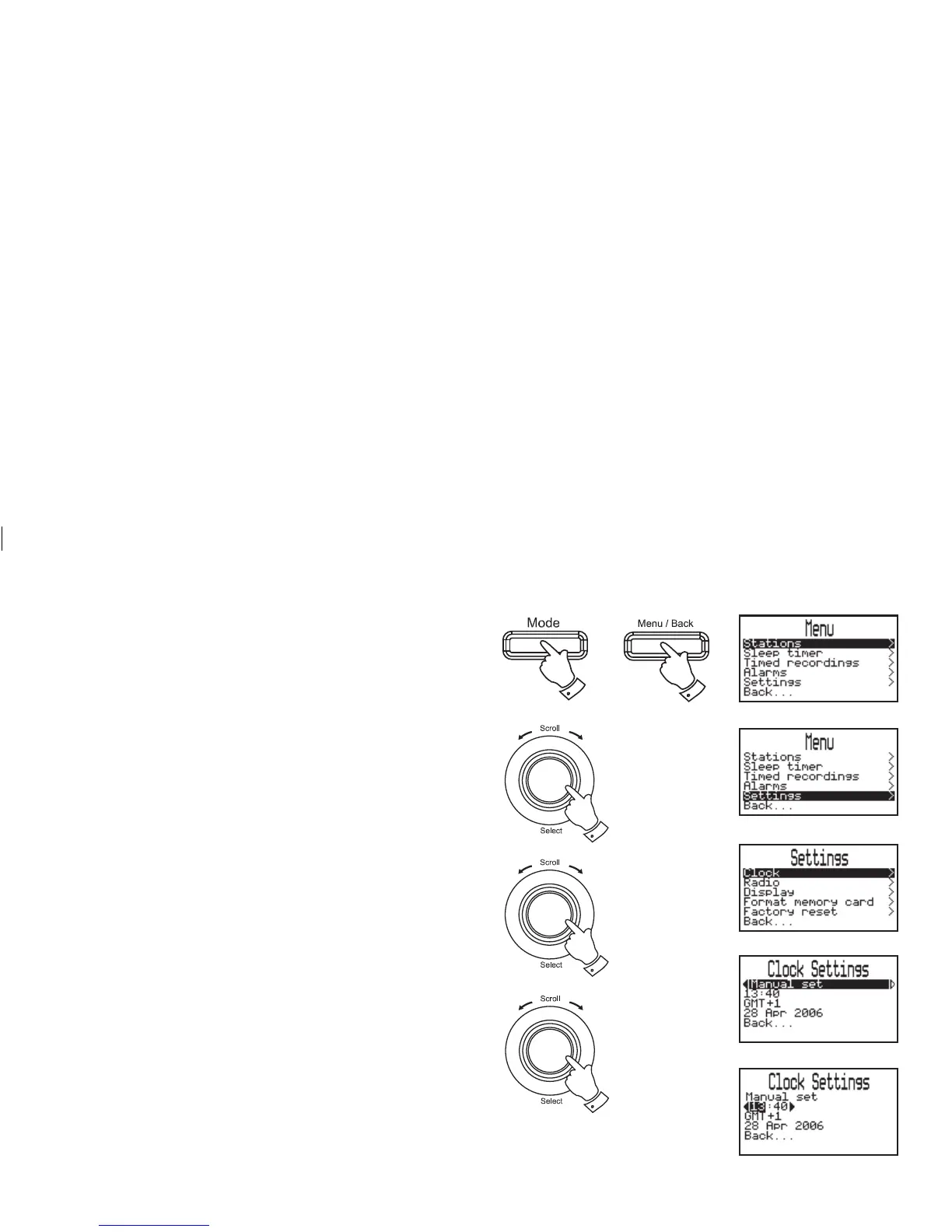
Setting the clock manually
1. Press the Mode button until the desired waveband is reached.
2. Press the Menu/Back button, the main Menu screen will be
selected.
3. Rotate the Tuning/Select control until "Settings" is highlighted
on the display. Press and release the Tuning/Select control.
4. Rotate the Tuning/Select control until "Clock" is highlighted on
the display. Press and release the Tuning/Select control.
5. Press and release the Tuning/Select control to enter the clock
set options.
6. Rotate the Tuning/Select control until "Manual set" is selected
on the display. Press and release the Tuning/Select control.
7. Rotate the Tuning/Select control to highlight the hour digits.
Press and release the Tuning/Select control.
8. Rotate the Tuning/Select control to select the required hour.
Press and release the Tuning/Select control.
41
continued on next page
3,4
1
2
5,6
7,8














 To Next Page