If you need any further advice, please call our Technical Helpline on :-
020 8758 0338 (Mon-Fri)
Setting the clock manually cont.
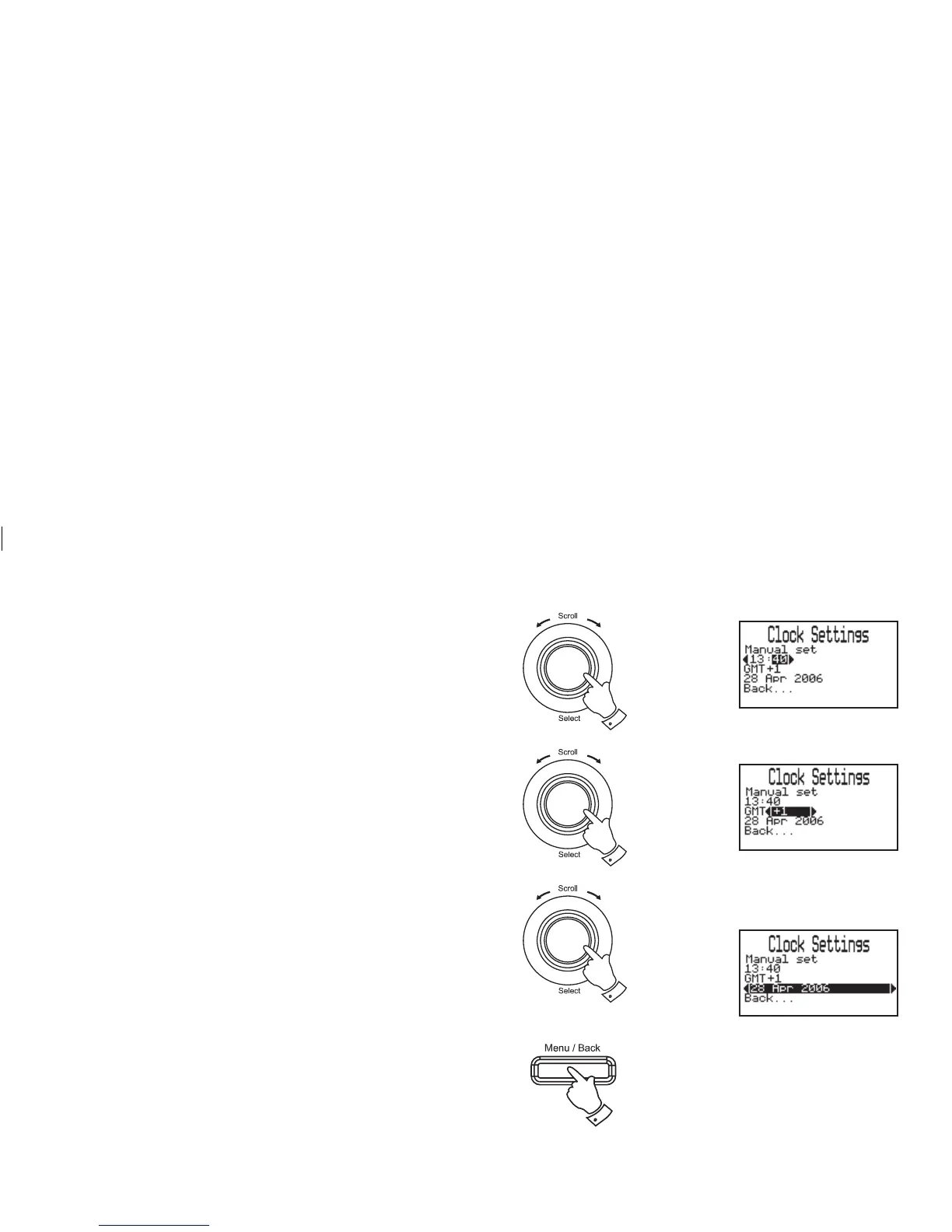
9. Rotate the Tuning/Select control to highlight the minute digits.
Press and release the Tuning/Select control to adjust the min-
utes.
10. Rotate the Tuning/Select control to select the required minute.
Press and release the Tuning/Select control.
11. Rotate the Tuning/Select control to highlight the GMT offset.
Press and release the Tuning/Select control to adjust the GMT
offset. GMT offset is used to control EPG recordings and is only
required when the clock is set manually.
12. Rotate the Tuning/Select control to select the required offset.
Press and release the Tuning/Select control.
13. Rotate the Tuning/Select control to highlight the date. Press and
release the Tuning/Select control to adjust the date setting.
14. Rotate the Tuning/Select control to select the required date. Press
and release the Tuning/Select control to confi rm the selection.
15. Press the Menu/Back button or select the "Back..." option to
exit back a menu or screen. Repeat twice more to exit the menu
completely.
42
15
9,10
11,12
13,14














 To Next Page