55
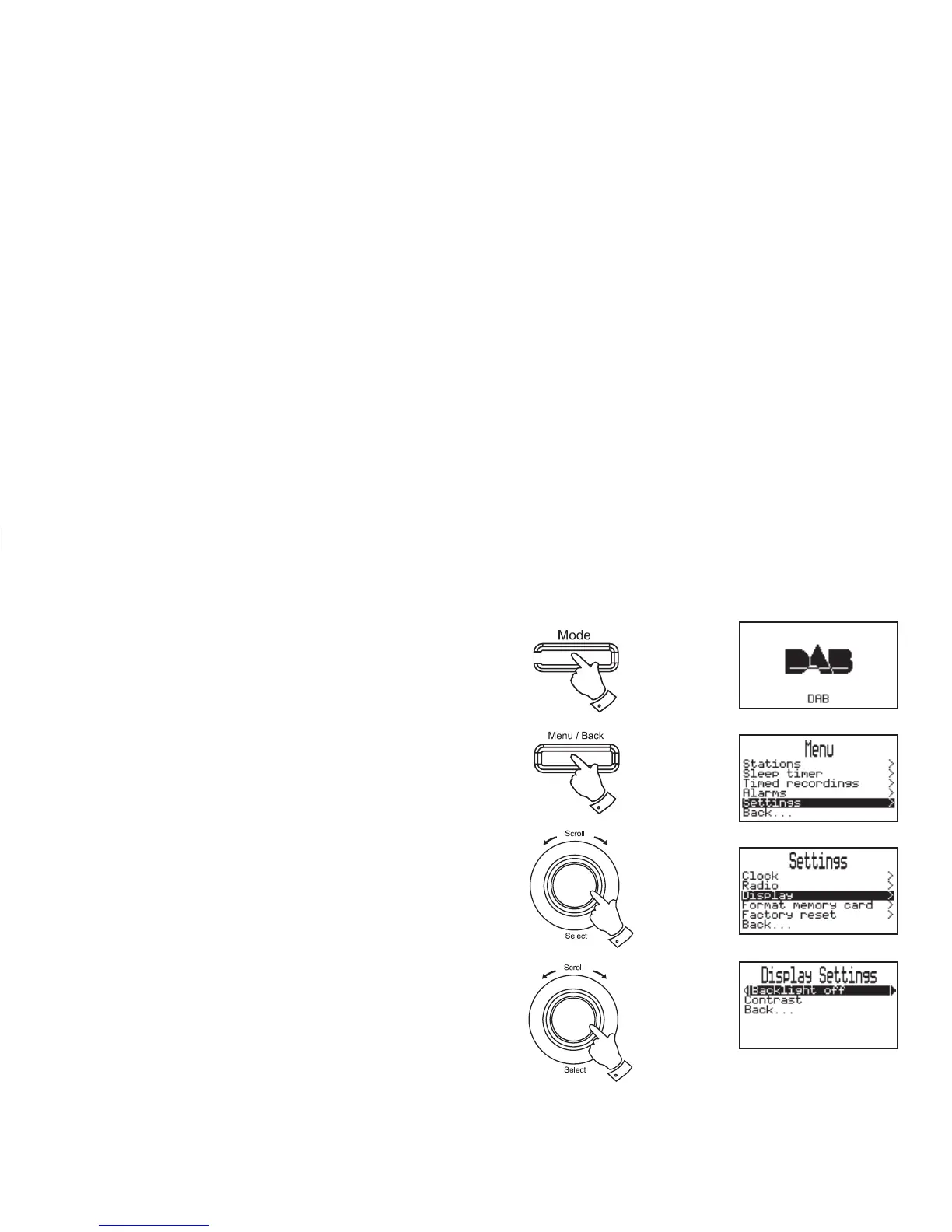
Display settings - Backlight
Enables the backlight to be set to one of the following settings..-100%,
50%, 10% and off.
1. Press the Mode button until the desired waveband is selected.
2. Press the Menu/Back button, the main Menu screen will be
selected.
3. Rotate the Tuning/Select control until "Settings" is highlighted
on the display. Press and release the Tuning/Select control.
4. Rotate the Tuning/Select control until "Display" is highlighted
on the display. Press and release the Tuning/Select control.
5. Rotate the Tuning/Select control until "Backlight" is highlighted
on the display. Press and release the Tuning/Select control.
6. To adjust the backlight setting, rotate the Tuning/Select control
until the required backlight setting is highlighted on the display.
7. Press the Menu/back button or select the "Back..." option to
exit.
5,6
3,4
1
2














 To Next Page