21
Sleep function
Your radio can be set to turn off after a preset time has elapsed. The sleep
setting can be adjusted between 15 and 90 minutes.
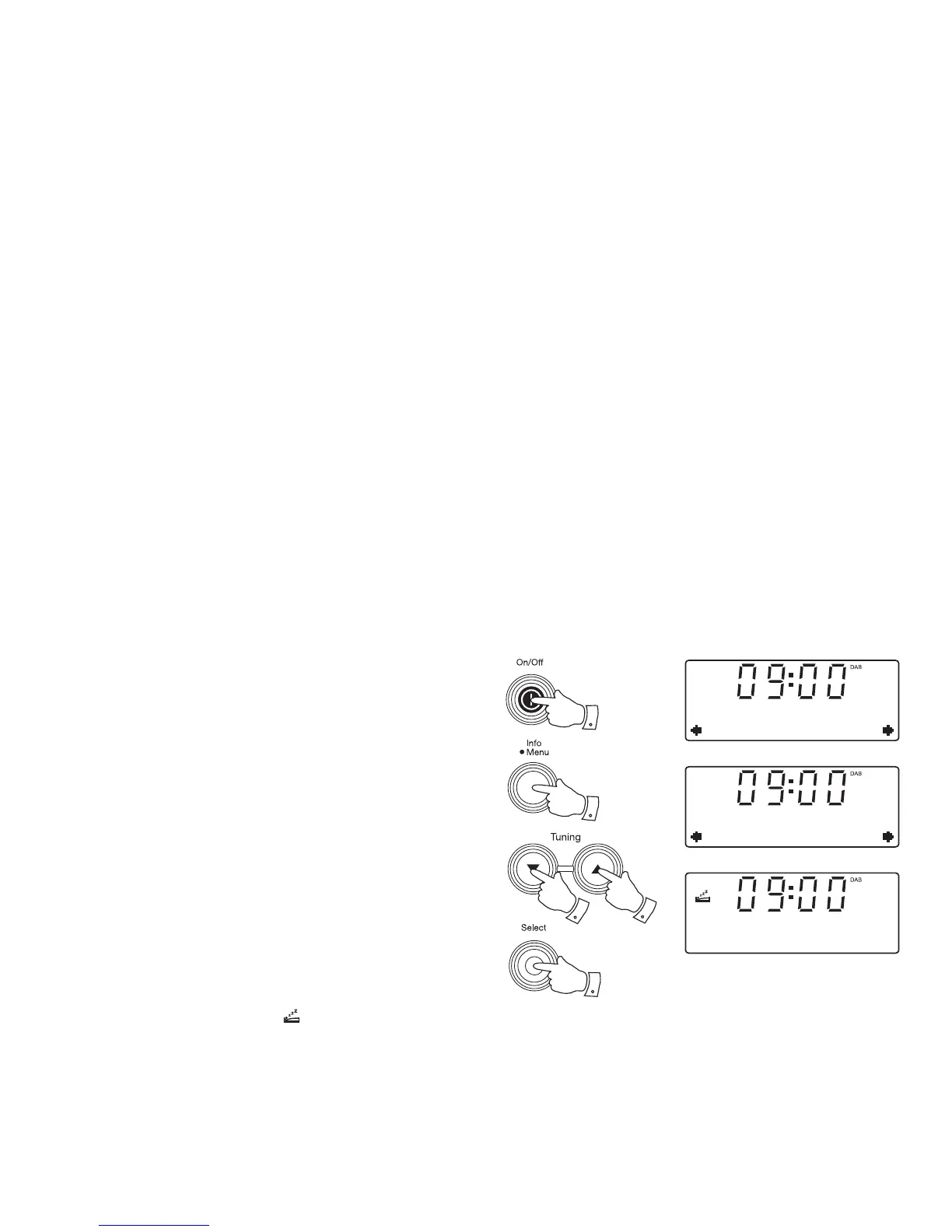
1. Press the On / Off button to switch on your radio.
2. Press and hold the Menu button.
3. Press the Tuning Up or Down buttons until 'System' shows on the
display. Press and release the Select button.
4. Press the Tuning Up or Down buttons until 'Sleep' shows on the
display. Press and release the Select button.
5. Press the Tuning Up or Down buttons to select the desired sleep
time. The options are 15, 30, 45, 60 or 90 minutes. A further press
will cause the sleep timer to be set to OFF which will cancel the sleep
function.
6. Press the Select button to confi rm the setting. The display will exit
the sleep options. The sleep symbol will show on the display. Your
radio will switch off after the preset sleep time has elapsed.
7. To cancel the sleep timer and switch off your radio before the chosen
sleep time has elapsed, press the On / Off button.
To cancel the sleep timer without switching off your radio, choose the
'OFF' setting in step 5.
3-5
3-5
3-6
2
1,7
DAB
System
System
Sleep
Set sleep time
15 minutes


 To Next Page