If you need any further advice, please call our Technical Helpline on :-
020 8758 0338 (Mon-Fri)
22
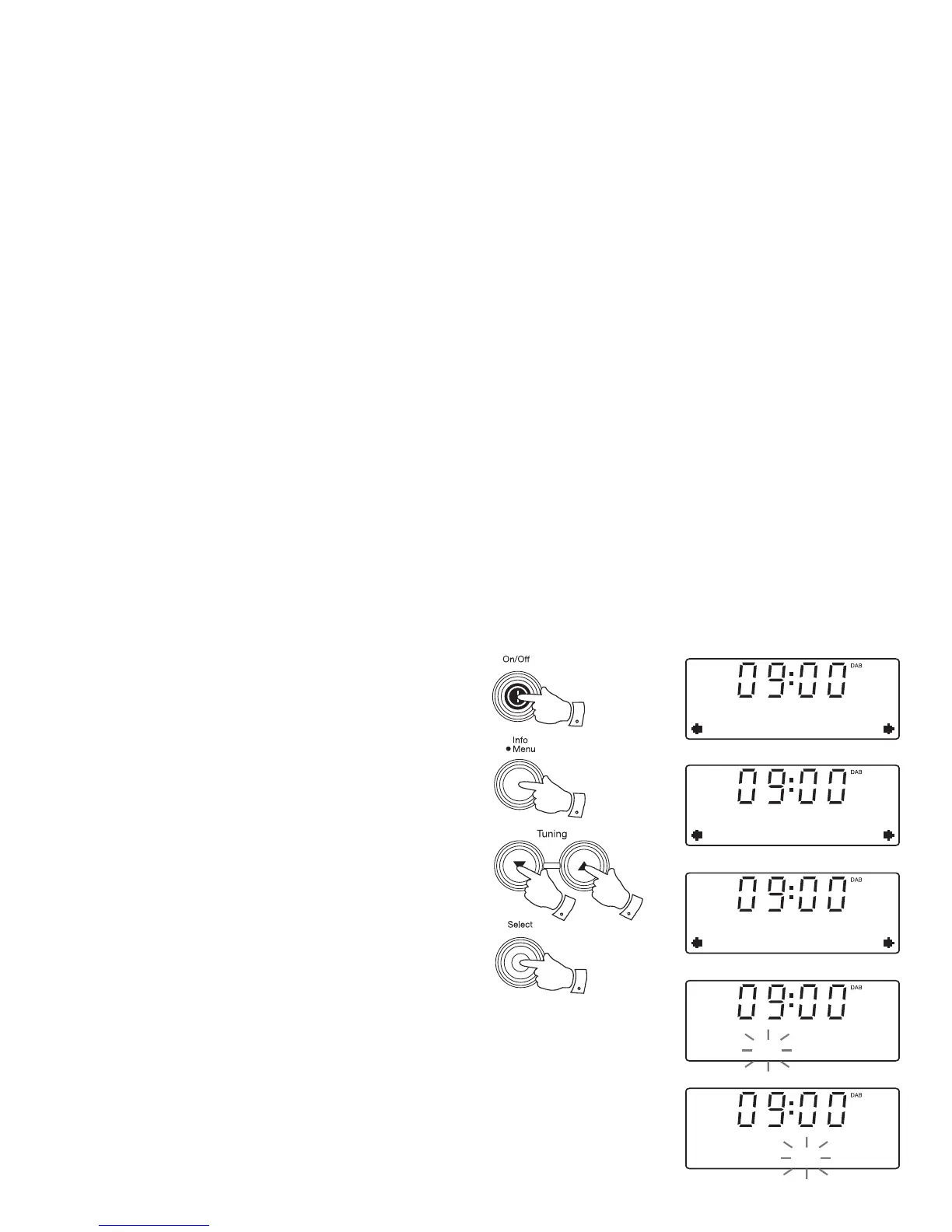
Setting the clock manually
Normally your radio will set its clock automatically using the DAB
radio signal. If no DAB signal is available and you need to set the time
manually, please follow the procedure shown below.
1. Press the On / Off button to switch on your radio.
2. Press and hold the Menu button.
3. Press the Tuning Up or Down buttons until 'System' appears on
the display. Press and release the Select button.
4. Press the Tuning Up or Down buttons until 'Time' appears on the
display. Press and release the Select button.
5. Press the Tuning Up or Down buttons until 'Set Time/Date' appears
on the display.
6. Press and release the Select button. The hour digits will fl ash on
the display.
7. Press the Tuning Up or Down buttons to set the desired hour.
8. Press and release the Select button. The minute digits will fl ash
on the display.
3-7
3-7
3-8
2
1
DAB
System
System
Time
Time
Set Time/Date
Set time
09:00
Set time
09:00


 To Next Page