If you need any further advice, please call our Technical Helpline on 1300 556 816
WM-202 Internet Radio and Media Player features
The Roberts WM-202 provides the following features in an attractive
compact unit:-
● Listen to local, regional, national and international broadcasts using
FM, DAB+ and Internet radio
● Listen to hundreds of radio stations from around the country, and
over 10000 from around the world via the internet without using your
PC.
● Listen to podcasts from a wide range of broadcasters.
● Support for on-demand broadcasts (where available).
● 15 radio station presets (5 Internet Radio, 5 DAB+ and 5 FM).
● Use the Media Player to play your music collection from your
computer.
● The Media Player can connect to Windows Shares or UPnP servers
(e.g. Windows Media Player 11). Connection to Apple and Linux
based computers is also possible.
● MP3, WMA and Real Audio formats are supported.
● The WM-202 connects to your home computer network, either using
WiFi or via a wired Ethernet connection.
● All radio station presets, network confi guration details and user
settings are retained in the event of a power failure.
2
● Large clock display with time and date when in Stand-by.
● Two alarm timers with snooze feature to wake you to either buzzer or
radio alarm.
● Adjustable sleep timer, can be set to turn the radio off between 15
and 120 minutes.
● Easy-to-read graphic display.
● Adjustable display backlight.
● Auxiliary input for playing audio from MP3 players or other audio
equipment.
● A standard 3.5mm headphone socket for private listening.
● High quality full-range, stereo speakers (2 x 3W).
● Mains or battery power (requires 6 x D cells for use away from the
mains supply).
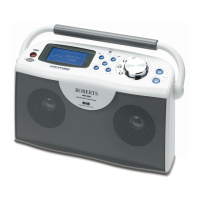
Your radio

 To Next Page
 Loading...