25
Need help? Call 1-800-620-2790 (U.S. and Canada)
RF-HTLF23
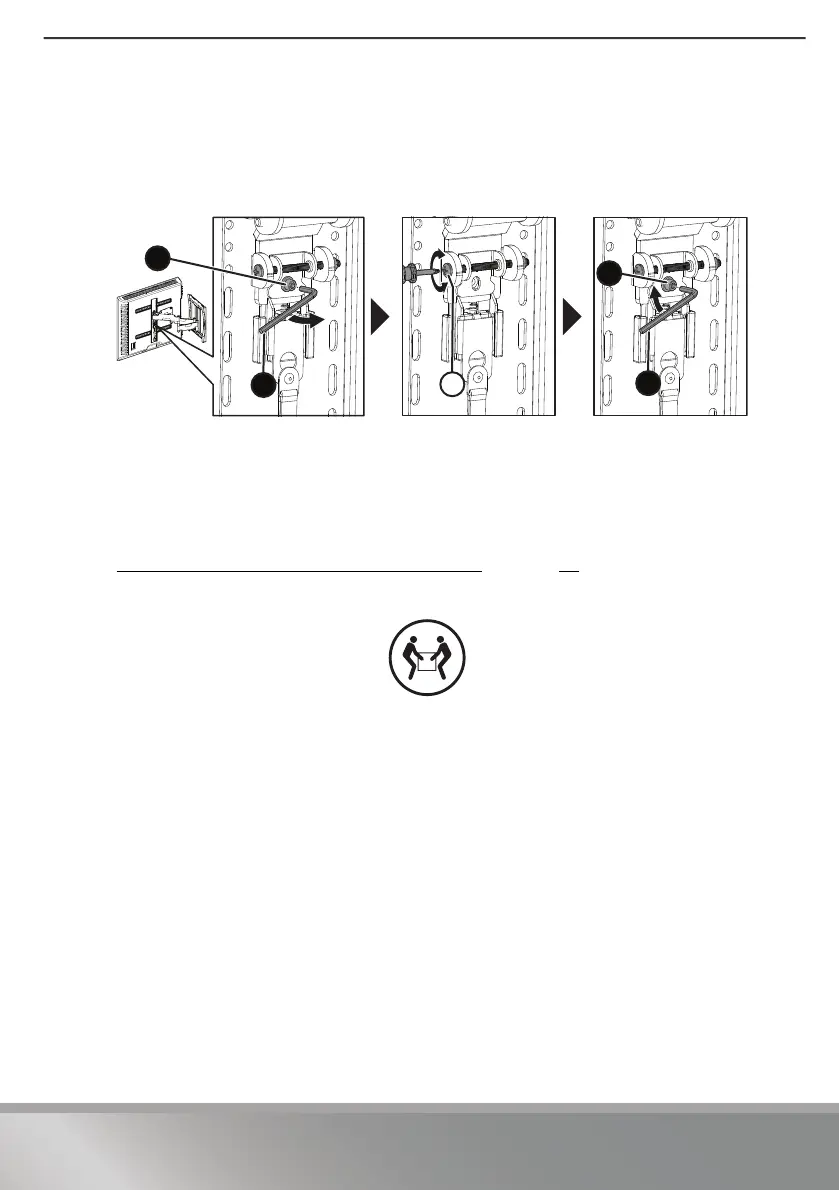
STEP 10 - Adjust the level
1 Loosen the locking screw (12).
2 Turn the leveling screw (
L) with a Phillips screwdriver to level your TV.
3 Retighten the screw (
12).
Removing your TV from the wall mount
1 Disconnect all cables, then pull down the release cord located below the vertical
bracket to unlock your TV from the vertical bracket.
2 Use the hex key (14)to remove the locking screw (12) from the arm assembly (see
STEP 8 - Attach your TV to the arm assembly
on page 22).
3 Lift your TV off the arm assembly.
For customer service, call: 1-800-620-2790 (U.S. and Canada)
12
14
L
12
14
HEAVY! You may
need assistance
with this step.


 To Next Page
 Loading...