14
Setting up your wireless speaker kit
Initial setup
To set up your sender/receiver:
1 Unpack the package contents.
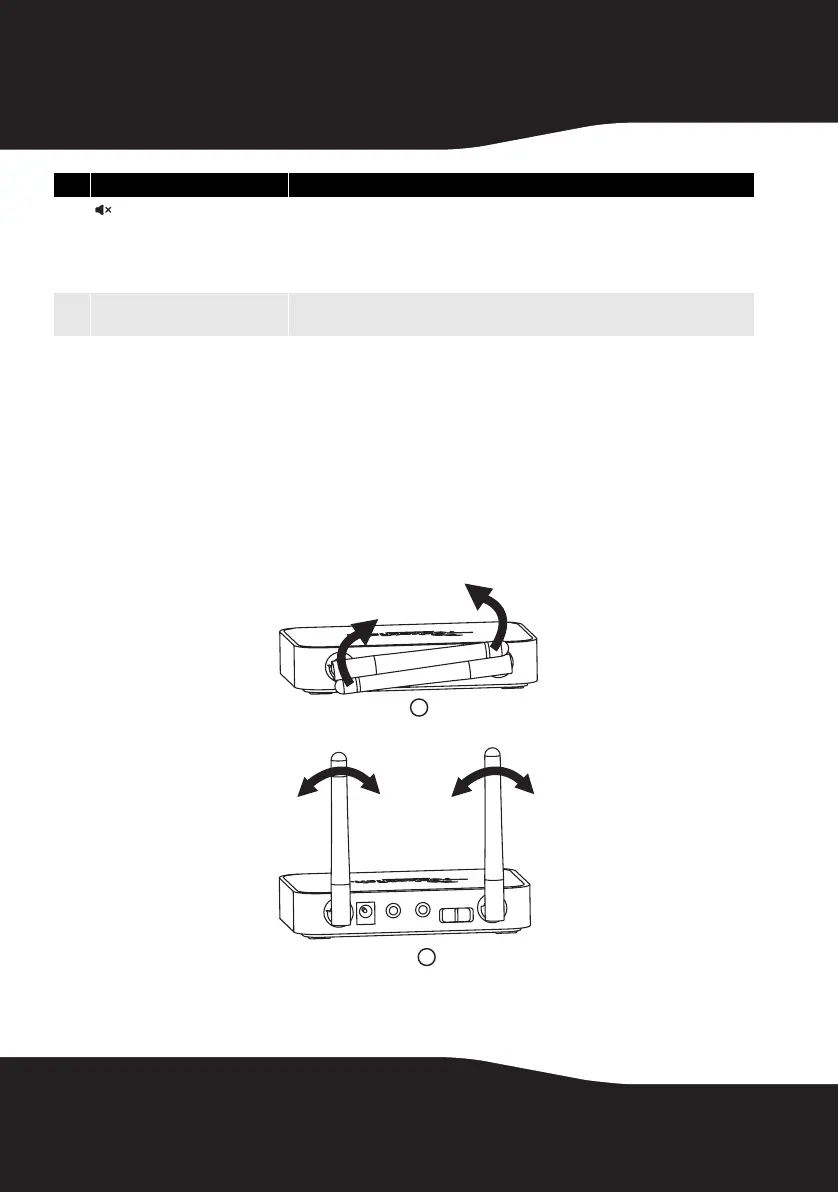
2 Adjust the antennas. For best results, raise the antennas of the
sender/receiver to the vertical position.
Tip: In some cases, you may improve range by rotating both antennas 45° to create a
90° angle similar to a wide “V”.
7
(mute - all)
Press to mute all audio streams in your Rocketboost network. Pressing mute again
at any Rocketboost receiver will “unmute” the stream that was last heard at that
receiver. This stream can now be heard from any other receiver that was receiving
that stream. Other streams are unmuted in the same way: pressing mute again at
each receiver will unmute the stream that was last heard at that receiver.
8
Next Source button Press to select different audio streams on your Rocketboost network. Each press
moves to the next source.
# Feature Description
1
2
10-1209 RF-RBWSO2_MAN_V3.fm Page 14 Monday, October 25, 2010 2:23 PM



 To Next Page