13RF-RBWS02
Remote control
# Feature Description
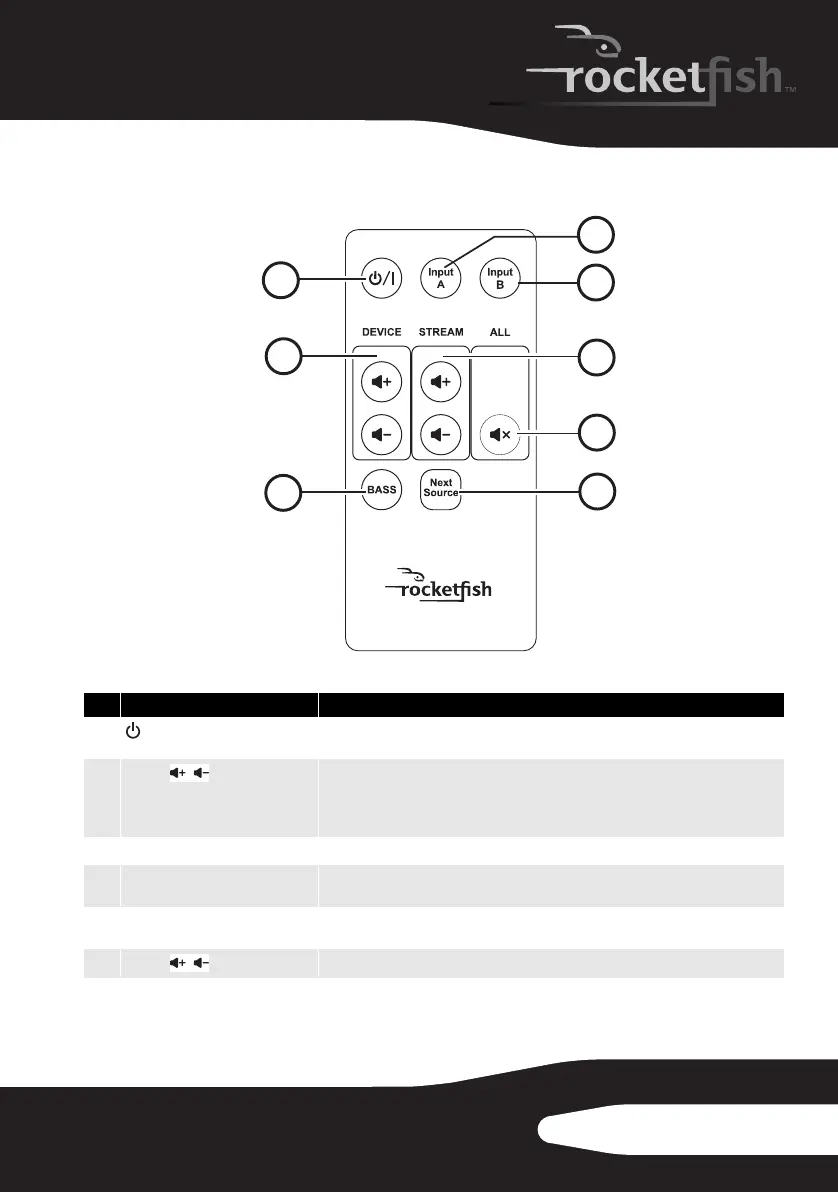
1
/| Standby/On button
Press to turn the sender/receiver or wireless speaker on. Press again to enter
standby mode.
2
Volume buttons (device)
Press to adjust the volume of the wireless speaker. The sender/receiver is a line-level
device, so this will only operate the volume control on the speaker. The volume on
the local amplifier or powered speakers must be adjusted when listening to the
sender/receiver's line level out.
3
BASS button Press to enable/disable the BASS enhancement.
4
Input A Press to toggle between SPEAKER-In A or Pre-In A of the sender (only applies to
Rocketboost model RF-RBKIT, purchased separately).
5
Input B Press to toggle between SPEAKER-In B or Pre-In B of the sender (only applies to
Rocketboost model RF-RBKIT, purchased separately).
6
Volume buttons (stream)
Press to adjust the volume of all devices receiving the same audio stream.
4
5
6
7
8
1
2
3
TM
/
/
10-1209 RF-RBWSO2_MAN_V3.fm Page 13 Monday, October 25, 2010 2:23 PM



 To Next Page