EasyManua.ls Logo

Rockwell Automation Allen-Bradley Logix 5000 User Manual

Rockwell Automation Allen-Bradley Logix 5000
33 pages
To Next Page IconTo Next Page
To Previous Page IconTo Previous Page
Page #14 background imageLoading...
Page #14 background image
Chapter 1
Program a Function Block Diagram
14 Rockwell Automation Publication 1756-PM009G-EN-P - February 2018
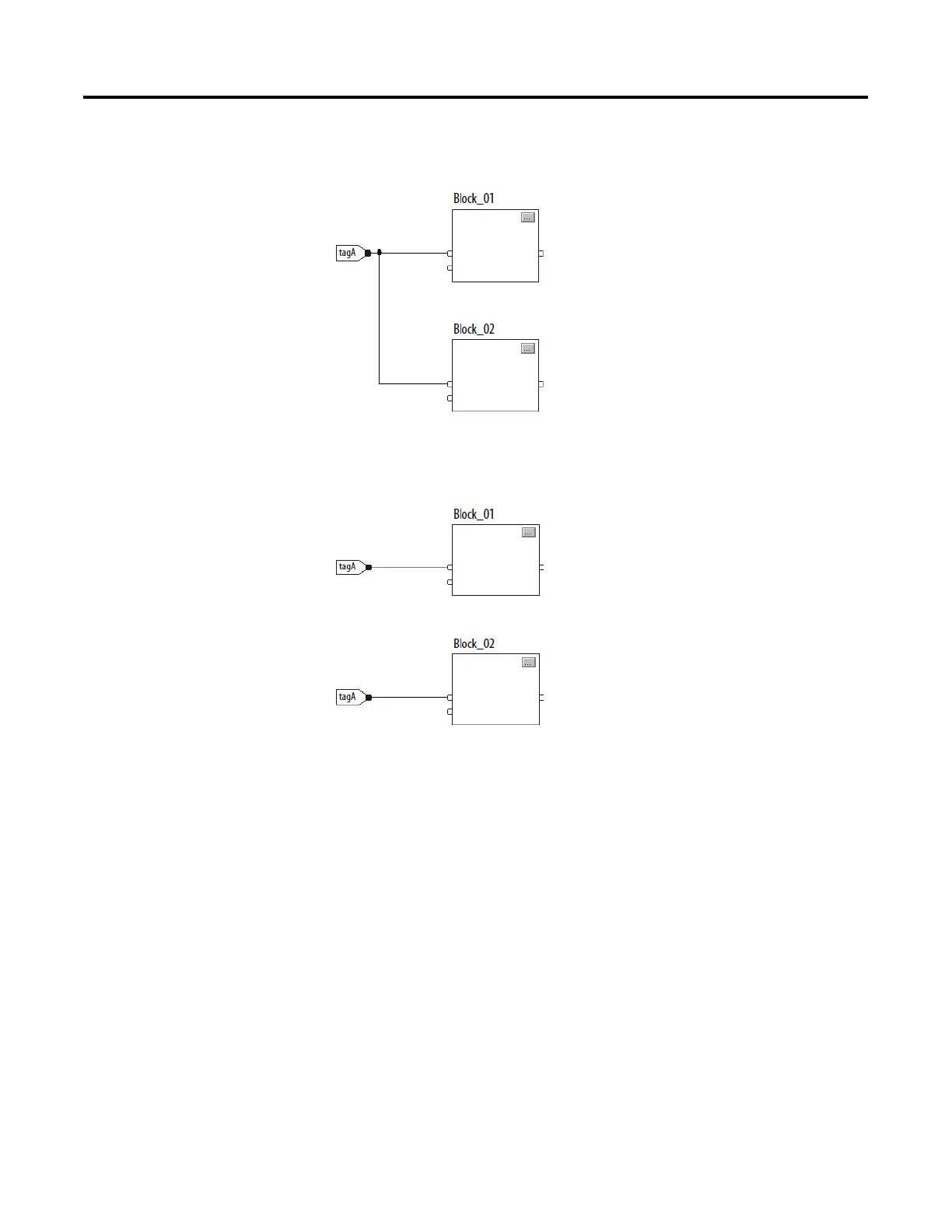
changes during execution of the routine, the stored value of tagA in the IREF
does not change until the next execution of the routine.
This example is the same as the previous example. The value of tagA is
stored only once at the beginning of the execution of the routine. The routine
uses this stored value throughout the routine.
With version 11 and later of the application, use the same tag in multiple
IREFs and an OREF in the same routine. Because the values of tags in IREFs
are latched every scan through the routine, all IREFs use the same value,
even if an OREF obtains a different tag value during execution of the routine.
In this example, if tagA has a value of 25.4 when the routine starts executing
this scan, and Block_01 changes the value of tagA to 50.9, the second IREF
wired into Block_02 still uses a value of 25.4 when Block_02 executes this
scan.

Question and Answer IconNeed help?

Do you have a question about the Rockwell Automation Allen-Bradley Logix 5000 and is the answer not in the manual?

Rockwell Automation Allen-Bradley Logix 5000 Specifications

General IconGeneral
BrandRockwell Automation
ModelAllen-Bradley Logix 5000
CategoryController
LanguageEnglish

Summary

Important User Information

Safety Warnings and Precautions

Details critical safety warnings including explosion, injury, and electrical hazards.

Summary of Changes

Global Changes Overview

Identifies changes applicable across the manual.

New Features Summary

Lists recently added or enhanced features.

Preface

Studio 5000 Environment Introduction

Introduces the Studio 5000 Automation Engineering & Design Environment.

Additional Resources and Legal Information

Provides links to related documents, legal terms, and software notices.

Warranty and Contact Information

Covers product warranty, environmental compliance, and support contact details.

Chapter 1: Program a Function Block Diagram

Routine Organization with Sheets

Explains organizing routines with sheets for navigation.

Function Block Elements

Details the elements used to control devices in FBD, like IREF, OREF, ICON, OCON.

Tag Naming Conventions

Guides on creating and assigning tag names for function block elements.

Defining Execution Order

Explains how to define the sequence of block execution via wiring.

Data Latching with IREFs

Describes how IREFs latch data for function block scans.

Determining Execution Order

Explains how the Logix Designer application determines block execution sequence.

Resolving Feedback Loops

Illustrates how to resolve feedback loops in function block diagrams.

Resolving Data Flow Between Blocks

Provides guidance on data flow indicators for multiple wires connecting blocks.

Creating a One Scan Delay

Shows how to implement a one scan delay using the Assume Data Available indicator.

Using Connectors (OCON/ICON)

Explains the purpose and rules for using output and input connectors.

Program and Operator Control

Details how to manage instruction control between program and operator interfaces.

Adding a New Sheet

Step-by-step guide to add a new sheet to a function block routine.

Adding Function Block Elements

Instructions on adding various elements like IREF, OREF, etc., from the toolbar.

Creating Text Boxes for Notes

Explains adding text boxes for clarifying FBD elements.

Managing Language Switching

Discusses options for supporting and switching project documentation languages.

Showing and Hiding Pins

Details how to show or hide pins in function block properties.

Wiring Elements Together

Guides on connecting elements by wiring output to input pins.

Marking Wires with Assume Data Available

Explains marking feedback wires to define loop data flow.

Creating and Assigning New Tags

Step-by-step guide to create and assign a new tag to an element.

Assigning Existing Tags

Instructions for assigning an existing tag from the Tag Browser.

Assigning Immediate Values (Constants)

Explains how to assign constant values directly to parameters.

Using IREFs for Value Assignment

Details the process of assigning values to IREFs.

Entering Values in Block Tags

Describes entering values directly into block tags via wire connections.

Adding Output and Input Connectors (OCON/ICON)

Guides on adding and configuring OCON and ICON elements.

Renaming Wire Connectors

Explains how to rename ICON or OCON elements individually.

Renaming Connector Groups

Describes how to rename multiple connected elements simultaneously.

Verifying Function Block Routines

Guides on using the Verify function to check for errors in routines.

Rockwell Automation Support

Installation Assistance and Returns

Provides support for product installation and return procedures.

Documentation Feedback

Instructions for submitting feedback on the manual.

Related product manuals