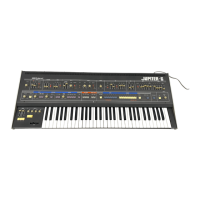
The Roland JUPITER-4 PLUG-OUT Software Synthesizer is a digital recreation of the classic JUPITER-4, designed to be used as a software synthesizer within a Digital Audio Workstation (DAW) or as a "plug-out" on a Roland SYSTEM-8 hardware synthesizer. This manual provides comprehensive guidance on its screen layout, sound parameters, and integration with the SYSTEM-8.
Function Description
The JUPITER-4 PLUG-OUT Software Synthesizer faithfully emulates the sound and functionality of the original JUPITER-4 COMPUPHONIC synthesizer. It allows users to create, edit, and manage a wide range of synthetic sounds, from classic pads and leads to complex arpeggiated sequences and effects. The software is designed to offer a detailed and authentic experience, including the subtle nuances of analog circuitry degradation and calibration.
Key functional blocks include:
- LFO (Low-Frequency Oscillator): Adds cyclical changes to the sound, such as vibrato or tremolo. Users can select various waveforms (Random, Square, Saw, Inverse Saw, Triangle, Sine), synchronize the LFO cycle start with key presses, and adjust the rate and range of the effect. A "DELAY TIME" parameter allows for a gradual application of the LFO modulation.
- VCO (Voltage-Controlled Oscillator): Generates the initial sound waveform. It offers different tonal registers (RANGE), LFO modulation for pitch, and Pulse Width (PW) modulation for asymmetrical square waves. PW can be controlled by LFO, VCF envelope, VCA envelope, or manually. Available waveforms include Off, Saw, Square, PWM, Saw+Square, and Saw+PWM. A "SUB" oscillator adds a square wave one octave below the main VCO.
- NOISE: Adds a noise component to the sound, with adjustable level.
- VCF (Voltage-Controlled Filter): Shapes the tone by filtering out certain frequencies. It includes a High-Pass Filter (HPF) and a Low-Pass Filter (LPF) with adjustable cutoff frequencies. LPF also features resonance (LPF RES) and keyboard tracking (KYBD FOLLOW). Both LFO and an envelope can modulate the VCF cutoff. "VELOCITY SENS" adjusts filter sensitivity to key press velocity.
- VCA (Voltage-Controlled Amplifier): Controls the volume of the sound. It also features "VELOCITY SENS" for volume response to key press velocity, LFO modulation, and an envelope for time-based volume changes. "TONE LEVEL" adjusts the overall high or low end of the sound.
- ENVELOPE (VCF and VCA): Provides time-based changes to the VCF cutoff frequency and VCA volume. Each envelope has Attack (A), Decay (D), Sustain (S), and Release (R) parameters, allowing for dynamic sound shaping.
- PORTAMENTO: Creates a smooth pitch transition between notes, with adjustable time and two types: fixed time regardless of distance, or fixed speed. It can be set to apply only in legato playing.
- TEMPO/ASSIGN MODE: Synchronizes LFO and effect delay times to a tempo. "ASSIGN MODE" offers different voice allocation modes: UNISON 1 (four voices in unison), UNISON 2 (voice allocation based on key presses), POLY 1 (one voice per key, suitable for arpeggios), and POLY 2 (one voice per key, also suitable for arpeggios).
- CIRCUIT MOD (Circuit Modification): Simulates calibration variations found in analog hardware. Increasing the amount creates more differences in calibration between voices, adding a unique unevenness or expressiveness to the sound. This interacts with the "CONDITION" knob.
- PATCH: Manages sound presets. Users can name, display, and navigate through patches.
- ARPEGGIO: An arpeggiator with various modes (UP, U+D, DOWN, RANDOM, CHORD) and step lengths (1/8, 1/16, 1/4T, 1/8T, 1/16T, 1/4). It can be turned on/off and held.
- OCTAVE/KEY HOLD: Shifts the keyboard pitch by octaves and provides a hold function for sustained notes.
- BEND/MODULATION: Configures pitch bend and modulation wheel behavior. "BEND RANGE" sets pitch bend width, "BEND GAIN" adjusts the ratio for expansion, and "BEND SENS" (VCO/VCF) determines how much pitch bend affects pitch and filter. "MOD SENS" (VCO/VCF) controls modulation wheel impact on pitch and filter.
- EFFECT DELAY/REVERB: Adds time-based effects. DELAY includes TYPE, TIME, and LEVEL. REVERB includes TYPE, TIME, and LEVEL.
- CONDITION: Simulates the slight degradation of analog circuitry over time, affecting the warmth and precision of the sound.
Usage Features
The JUPITER-4 PLUG-OUT Software Synthesizer offers a highly interactive and intuitive user interface, designed to mimic the hardware experience.
- Screen Layout: The main window has two primary views:
- EDIT Screen: Presents a detailed graphical representation of the JUPITER-4 hardware, allowing direct manipulation of all sound parameters via virtual knobs and sliders. This view is ideal for in-depth sound design.
- BROWSE Screen: Focuses on patch management, displaying a list of patches, their ratings, and notes. It also includes a "TWEAK Panel" for quick adjustments of main parameters (VCF Cutoff, Resonance, VCA Level, Amp Envelope, Delay/Chorus, Reverb).
- Patch Manager Window: Accessed via a dedicated button, this window allows users to save, export, import, delete, and organize patches and banks. It supports "Details View" (showing ratings and notes) and "List View" (a compact list). Patches can be swapped by dragging, and names, ratings, and notes can be edited directly.
- SYSTEM-8 Integration (Plug-Out): A core feature, allowing the software synthesizer to be installed and run directly on a Roland SYSTEM-8 hardware unit.
- Plug-Out Procedure: Users select a plug-out destination (PLUG-OUT1-3) on the SYSTEM-8, and the JUPITER-4 software is transferred. This enables playing the JUPITER-4 directly from the SYSTEM-8 without a computer, using the SYSTEM-8's knobs and sliders for control.
- Send/Get Temporary Patch: Facilitates transferring the currently edited temporary patch between the software and the SYSTEM-8. This is crucial for seamless workflow between software editing and hardware performance.
- MIDI Learn Function: Allows users to associate any sound parameter (knob or slider) with an external MIDI control change message. This is done by right-clicking the parameter, choosing "Learn MIDI CC," and then operating the external MIDI device. This enables hands-on control with MIDI controllers.
- Settings Menu: Provides access to various global settings:
- Layout: Switches between JUPITER-4 (original hardware) and SYSTEM-8 control layouts.
- Output View: Configures the header's output display (Digital Meter, Analog Meter, Scope).
- TWEAK Panel: Shows or hides the TWEAK panel in the BROWSE screen.
- MIDI Control Mapping: Sets up or clears MIDI control mapping for the SYSTEM-8, allowing it to act as a control surface.
- Voices: Adjusts maximum polyphony (2-8 voices) to manage CPU load.
- Optimize for Lower CPU Usage: A toggle to prevent notes from cutting off during high CPU usage.
- Setup: Configures MIDI input/output settings and mouse scroll direction (Mac only). These settings apply to all instances of the JUPITER-4.
- Help/About: Accesses the owner's manual and displays software information.
- Zoom: The window can be resized by dragging its bottom-right corner.
- Undo/Redo: Buttons are available to undo or redo parameter edits.
- Rating System: Patches can be rated with stars (1-5) for easy organization and recall.
- Notes: Users can add up to 40 characters of text notes to each patch for descriptions or reminders.
- Keyboard Area: The virtual keyboard allows users to audition sounds. Velocity is determined by where the key is clicked (higher for lower velocity, lower for higher velocity). The mouse wheel can shift the keyboard octave.
Maintenance Features
The manual outlines several features related to maintaining optimal performance and managing the software:
- MIDI Port Configuration: Users are instructed to specify the MIDI Input/Output settings in the Setup window upon first use. Correct MIDI port selection (specifically "SYSTEM-8 CTRL" for SYSTEM-8 integration) is crucial for proper communication and avoiding errors during plug-out or patch transfer.
- CPU Usage Optimization: The "2-8 Voices" setting allows users to reduce the maximum polyphony, thereby lowering the CPU load. Additionally, the "Optimize for Lower CPU Usage" toggle can be activated if notes are cutting off due to high CPU demands.
- Patch Management: The Patch Manager window serves as a central hub for organizing and backing up user-created sounds. Exporting banks to files ensures that custom patches are saved independently of the software installation, allowing for easy transfer or recovery.
- MIDI Control Mapping Reset: The "Clear MIDI Control Mapping" function in the settings allows users to revert all MIDI control change mappings to their default state, which can be useful for troubleshooting or reconfiguring a controller.
- SYSTEM-8 Local Switch Setting: For users integrating with a DAW, the manual advises setting the SYSTEM-8's "Local Sw" to "SURFACE" to ensure that only the JUPITER-4 plug-in produces sound, preventing the internal sound engine of the SYSTEM-8 from interfering.
- Error Message Guidance: The manual provides specific troubleshooting steps for common error messages related to plug-out or patch transfer, such as checking MIDI port settings, SYSTEM-8 connection, and the SYSTEM-8's MODEL button status.
Overall, the Roland JUPITER-4 PLUG-OUT Software Synthesizer is a powerful and versatile tool for sound creation, offering both deep editing capabilities and seamless integration with Roland's hardware ecosystem. Its design prioritizes an authentic JUPITER-4 experience while providing modern software conveniences.

 Need help?
 General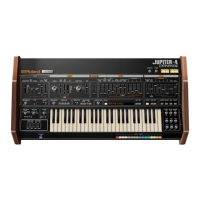

 To Next Page