50
White Balance
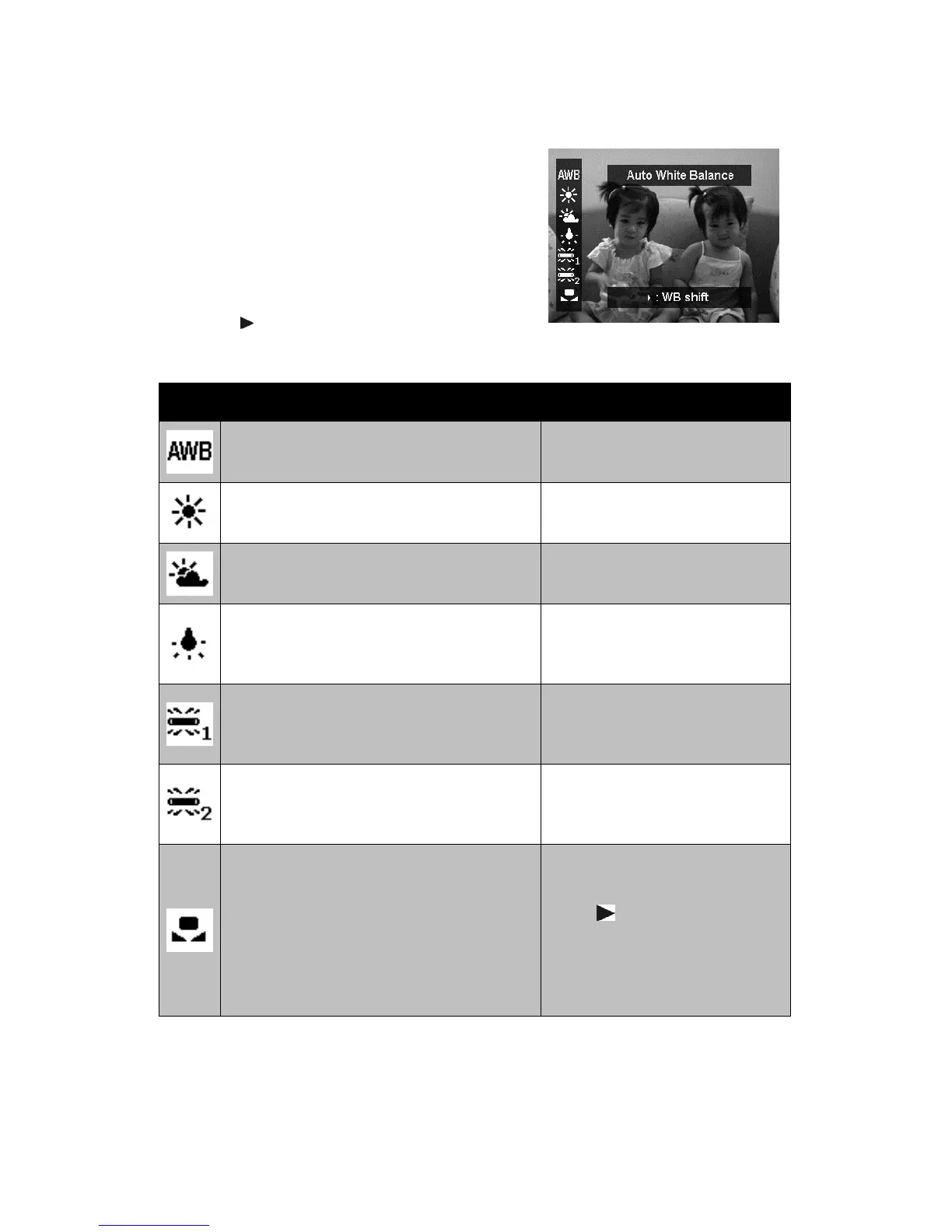
This sets the white balance for a variety of
lighting conditions and permits images to be
captured that approach the conditions that are
seen by the human eye.
• As you move through the selection, you can
see the preview on the LCD monitor
synchronously.
• Press to enter WB Shift. This feature
allows you to correct the white balance of
AWB option.
Icon Item Description
Auto White Balance
The camera automatically
adjusts the white balance.
Daylight
Ideally used for bright sunny
conditions.
Cloudy
Ideally used for cloudy
conditions.
Tungsten
Ideally used for indoor images
with tungsten or halogen
lighting without a flash.
Fluorescent 1
Ideally used for indoor images
with bluish fluorescent lighting
conditions.
Fluorescent 2
Ideally used for indoor images
with reddish fluorescent
lighting conditions.
Custom
Used when light source cannot
be specified.
Press for the camera to
automatically adjust the
appropriate white balance
setting according to the
environment.








 To Next Page