42
User manual
Room air conditioner - TETA X
EN
1. REMOTE CONTROLLER BUTTONS
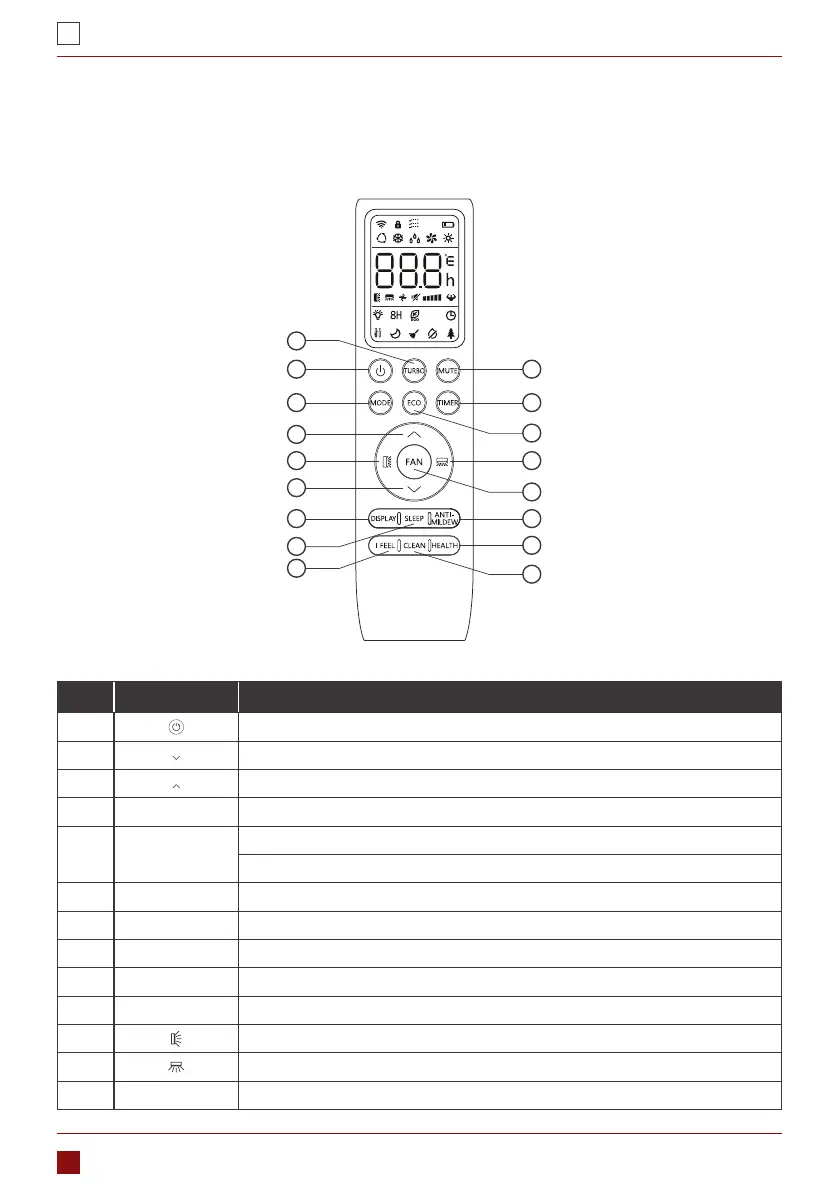
Id Button Function
1. To turn on/o the air conditioner .
2. To decrease temperature, or Timer setting hours.
3. To increase temperature, or Timer setting hours.
4. MODE To select the mode of operation (AUTO, COOL, DRY, FAN, HEAT).
5. ECO
To activate/deactivate the ECO function.
Long press to activate/deactivate the 8°C heating function (depending on models).
6. TURBO To activate/deactivate the TURBO function.
7. FAN To select the fan speed of auto/mute/low/low-mid/mid/mid-high/high/turbo.
8. TIMER To set the time for timer on/o.
9. SLEEP To switch-on/o the function SLEEP.
10. DISPLAY To switch-on/o the LED display.
11. To stop or start horizontal louver movement or set the desired up/down air ow direction.
12. To stop or start horizontal louver movement or set the desired left/rightair ow direction.
13. I FEEL To switch-on/o the I FEEL function.
PART 4. REMOTE CONTROL
1
2
3
4
14
8
1211
5
6
7
10
18
19
16
9
13
GOTE



 To Next Page