43User manual
Room air conditioner - TETA X
EN
PART 4. REMOTE CONTROL
Id Button Function
14. MUTE To switch-on/o the SILENCE function.
15. MODE + TIMER To activate/deactivate the CHILD-LOCK function.
16. CLEAN To activate/deactivate the SELF-CLEAN function (depending on models).
17. FAN + MUTE To activate/deactivate the WINDLESS function (depending on models).
18. HEALTH To activate/deactivate the air purication functions (depending on models).
19. ANTIMILDEW To activate/deactivate the anti-mildew function.
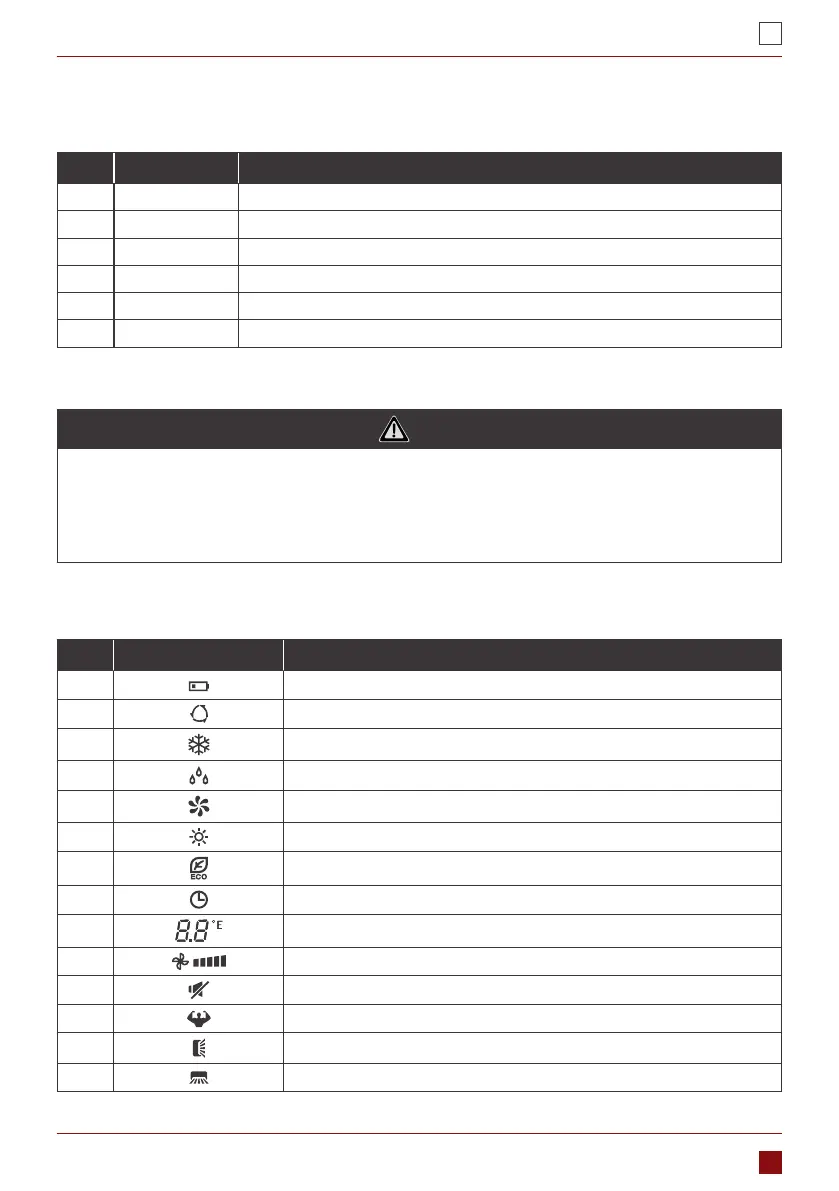
2. REMOTE CONTROLLER DISPLAY
No. Symbols Meaning
1. Battery indicator
2. Auto Mode
3. Cooling Mode
4. Dry Mode
5. Fan only Mode
6. Heating Mode
7. ECO Mode
8. Timer
9. Temperature indicator
10. Fan speed: Auto/low/low-mid/mid/mid-high/high
11. Mute function
12. TURBO function
13. Up-down auto swing
14. Left-right auto swing
NOTE
• The display and some functions of the remote control may vary according to the model.
• The shape and position of buttons and indicators may vary according to the model, but their func-
tion is the same.
• The unit conrms the correct reception of each button with the beep.



 To Next Page