30
User manual
Wired control - ORIS
EN
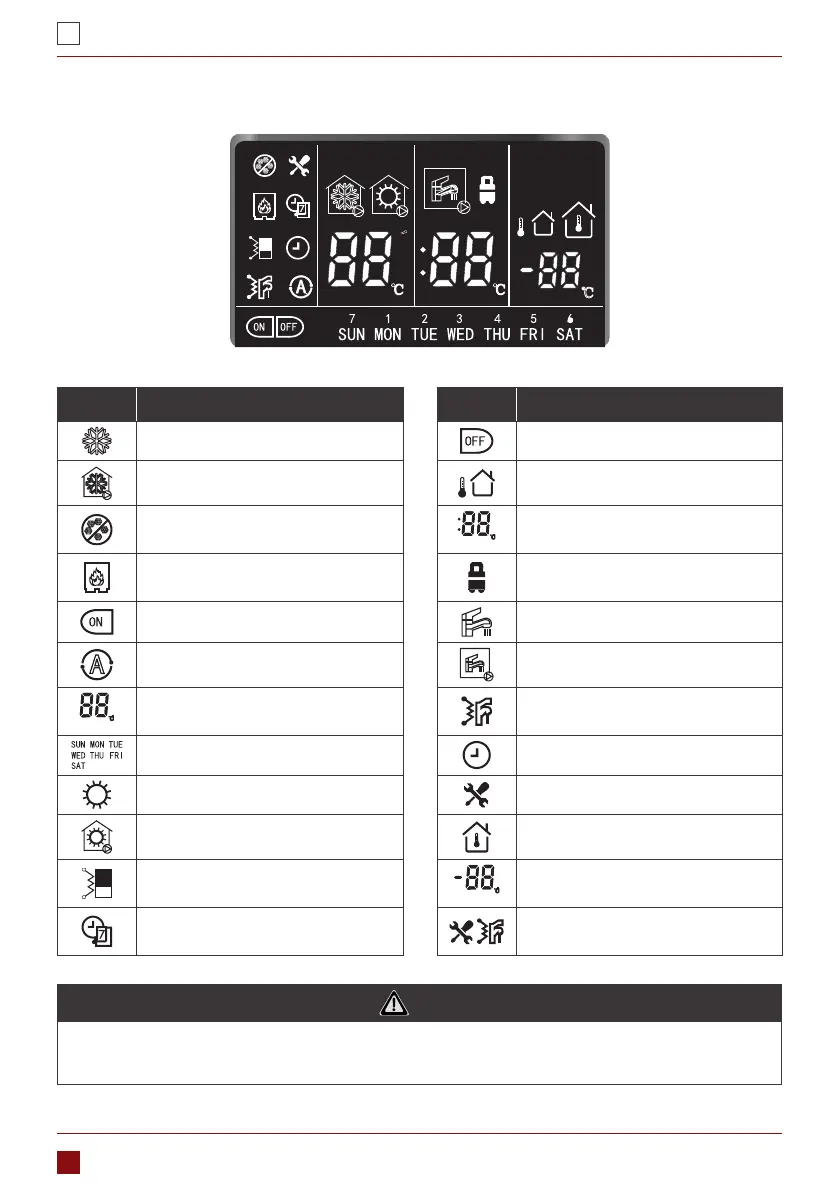
1.1.2. Overview of Icons
Icon Description Icon Description
Non-operating cooling mode Timer o
Operating cooling mode OTA (water setpoint control)
Anti-frozen protection
LED display (Middle)
DHW temp./time display (minute)
External heat source (boiler)
Constant light: Eco mode
Flash: Away mode
Timer ON Non-operating DHW mode
Air purge mode Operating DHW mode
LED display (Left)
LWT/time display (hour)/alarm DHW EHs
Days of week Clock
Non-operating heating mode Alarm
Operating heating mode IAT (air setpoint control)
Main water loop EHs
LED display (Right)
IAT/OAT (OAT is reserved)
Weekly timer
Always light: It can not achieve
Anti-legionellasetting point
NOTE
1. The home screen display may vary depending on unit conguration and screen setting.
2. If anti-legionella can not achieve setting point, it needs to repower to reset.


 To Next Page
 Loading...

