29User manual
Wired control - ORIS
EN
Wired controller can be installed inside your home or on the unit itself for split type. This manual provides
guidelines on how to use this interface eectively.
If you have any questions regarding the display and its conguration, please contact your installer for more
information.
CAUTION
It can not press the button of wired controller within power on for 5s.
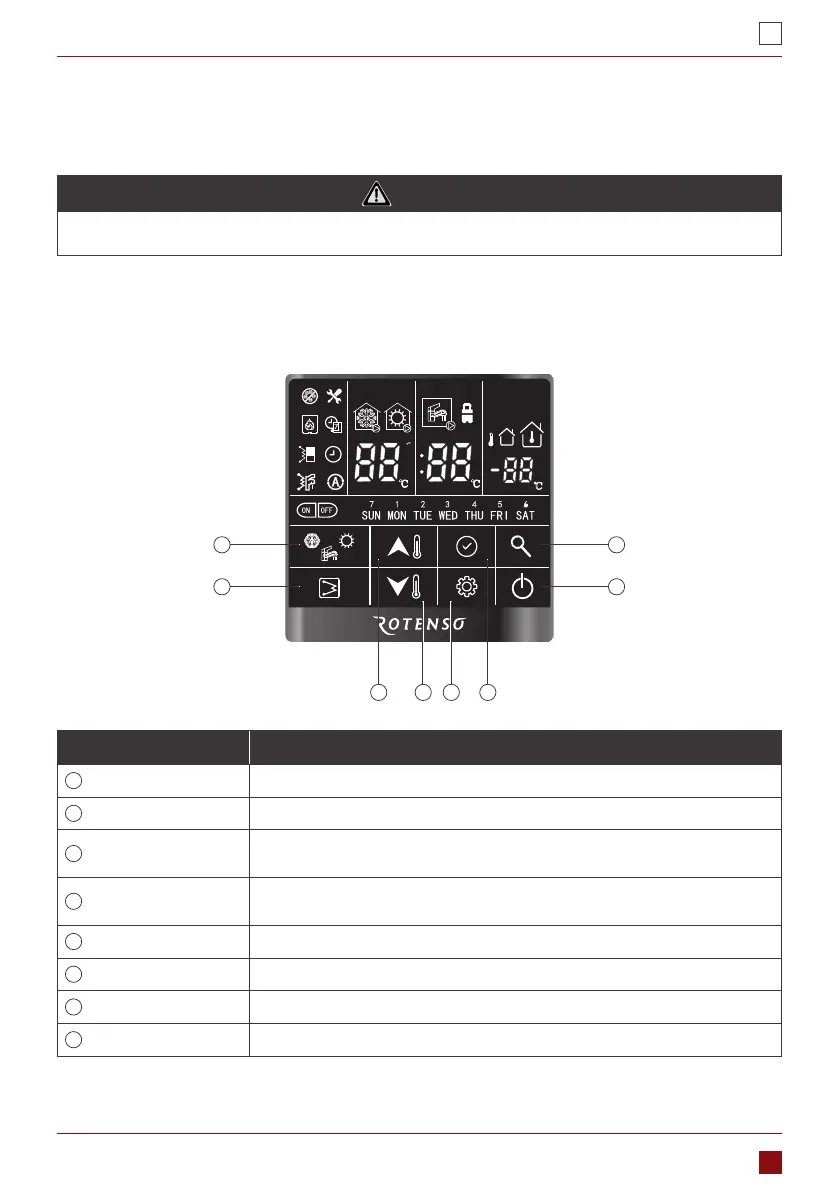
1.1. INTERFACE INTRODUCTION
1.1.1. Button Overview
1
2
8
7
4 53 6
Denition Description
1
Mode button
Used to change the running mode
2
Electric heater button
Used to manual on/o the DHW EHs manually
3
Up button
Used to change the value of parameter or turn page during system
conguration or commissioning
4
Down button
Used to change the value of parameter or turn page during system
conguration or commissioning
5
Setting button
Used to set user parameter conguration or technical parameter conguration
6
Conrm butto
Used to conrm the current setting
7
ON/OFF button
Used to turn on/o the unit
8
Query button
Used to query the operation parameter or conguration parameter


 To Next Page
 Loading...

