35User manual
Wired control - ORIS
EN
2.4. CURRENT SETPOINT SETTING
Here are two setpoint control: (Refer to the technical parameter conguration, item 1 for details setting)
1. Water setpoint control; the unit is controlled by water setpoint;
2. Air setpoint control: the unit is controlled by the air setpoint, and it requests to install the wired controller
into the room.
There is an IAT sensor built inside the wired controller to detect the room temperature.
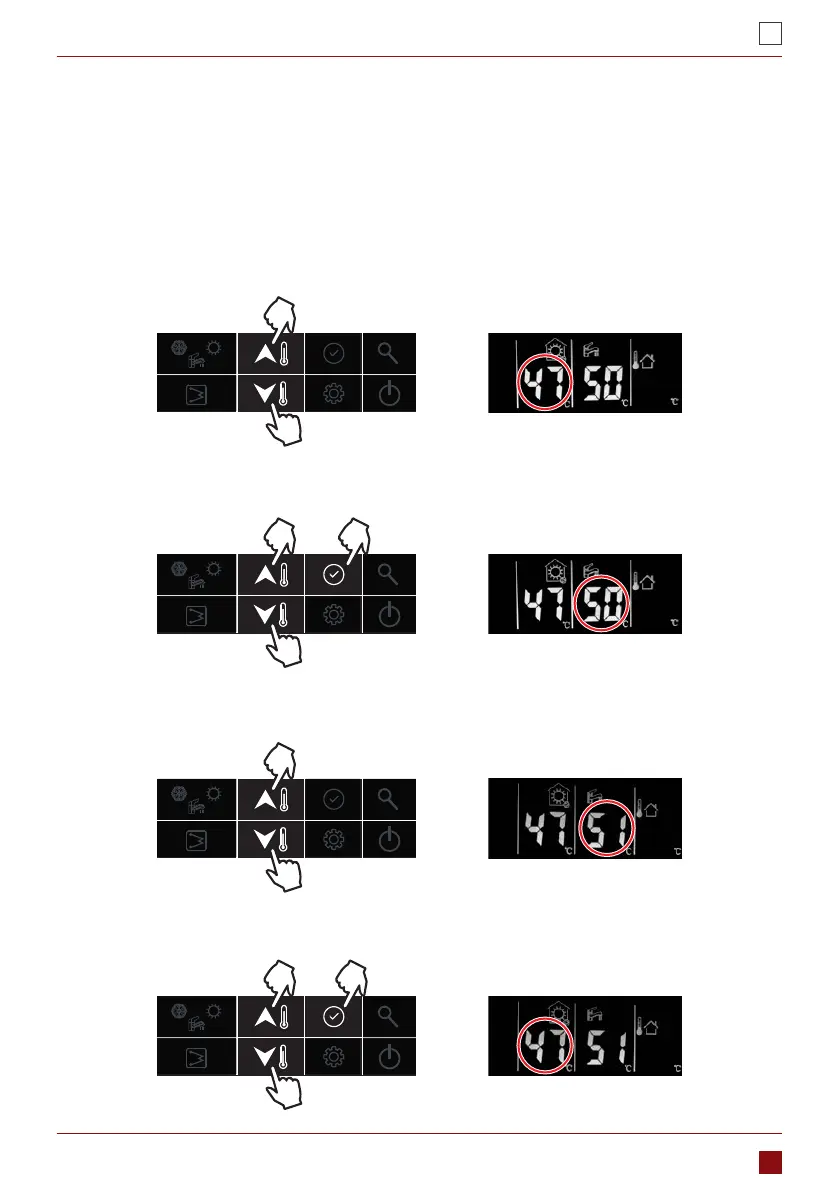
Here are the steps to change setting of water setpoint control:
1. While in standby mode or operating cooling/heating mode:
a. First time press “up” or “down” button to change the setting value of LWT;
b. Then press the conrm button or wait for 5s without pressing any button to DHW temperature setting.
Then press “up” or “down” button to change the setting value of DHW.
2. While operating DHW mode:
a. First time press “up” or “down” button to change the setting temperature of DHW;
b. Press the conrm button to setting value of LWT. Then press “up” or “down” button to change the setting
value of LWT.



 To Next Page