31User manual
Wired control - ORIS
EN
1.2. BUTTON INTRODUCTION
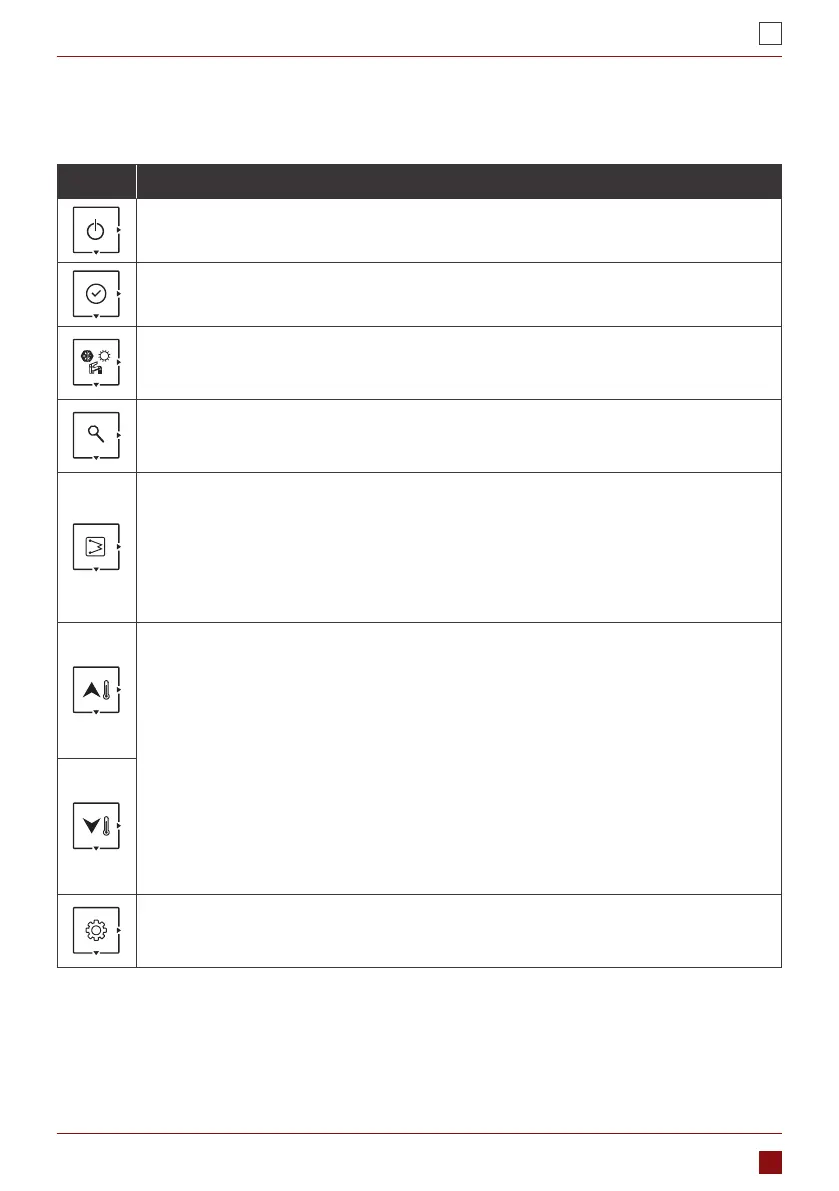
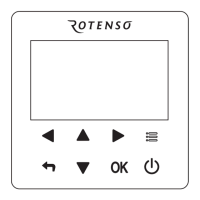
This wired controller has 8 buttons for the setpoint control, conguration, parameter check, etc. Detail of each
button is as below table:
Button Description
ON/OFF
Press this button to turn on and turn o the unit.
CONFIRM
Press this button to conrm the setting to exit interface of parameter setting or query.
MODE
1. Press this button to change the mode: cooling-heating-cooling.
2. Press and hold this button to active the anti-legionella mode manually.
QUERY
1. Press this button to check the conguration and running parameters.
2. Refer to the section 3, parameter and status check for details.
EHs
1. While operating heating mode, press this button to activate/deactivate the main water loop
EHs manually.
2. While operating the DHW mode, press this button to activate/deactivate the DHW EHs
manually.
3. Press and hold this button to start the force-defrosting, and wired controllerI will display “dF”
for 5s.
UP/DOWN
1. Temperature setting
• While in standby mode, rst time press this button to change the setting value of LWT,
press the conrm button or wait for 5s without pressing any button to DHW temperature
setting.
• While operating cooling/heating mode, rst time press this button to change the setting
value of LWT, press the conrm button or wait for 5s without pressing any button to DHW
temperature setting.
• While operating DHW mode, rst time press this button to change the setting
temperature of DHW, press the conrm button or wait for 5s without pressing any button
to setting value of LWT.
2. Time correction and timer setting
• Refer to details of conguration.
SETTING
1. User parameter conguration, please refer to conguration section.
2. Technical parameter conguration, please refer to conguration section.


 To Next Page