40
User manual
Wired control - ORIS
EN
2.7. BUTTON LOCK SETTING
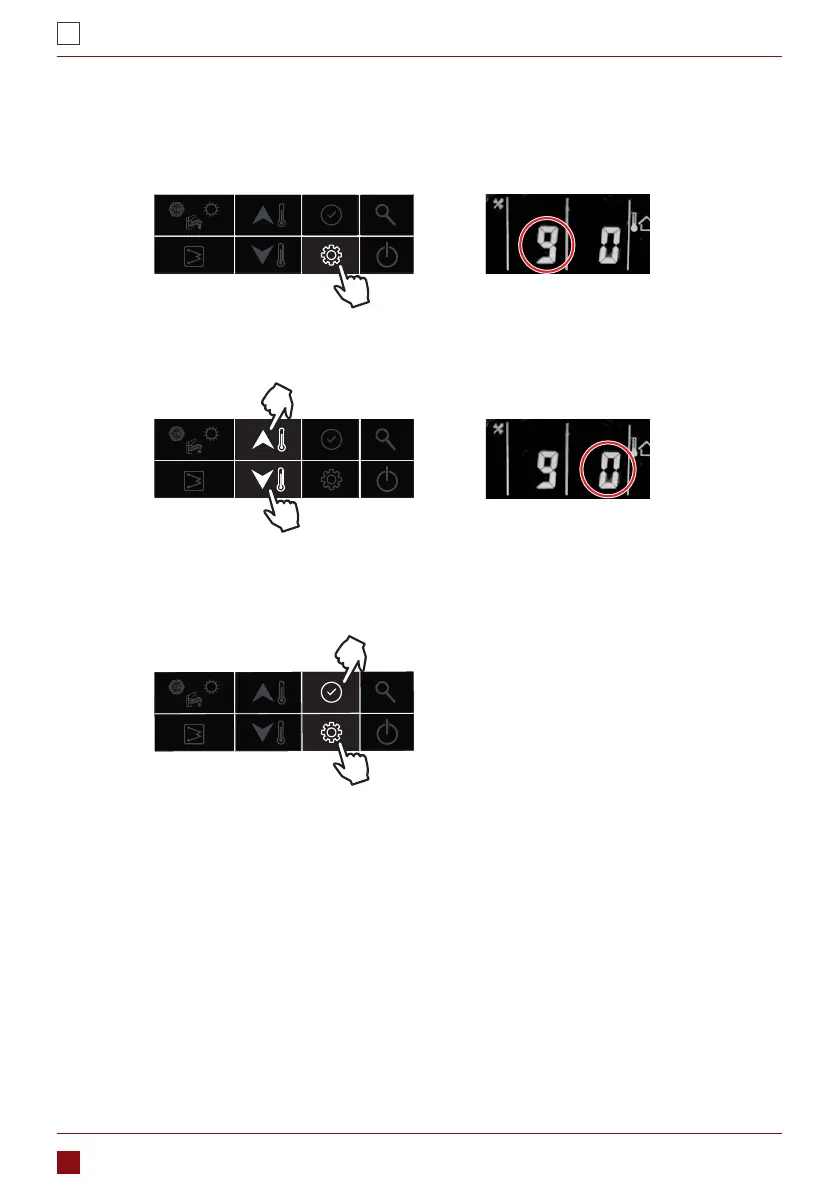
Used to lock the button of wired controller in case of touching by mistake; and double press “setting” button
to unlock.
1. Press the “setting” button to item 9: wired controller button lock
2. Press the “up” or “down” button to set the value (0-unlock; 1-lock)
3. Then press “conrm” button to conrm and exit user setting or you can also press “setting” button to go to
next item. (Refer to the user parameter conguration for the full parameters setting)
3. CONFIGURATION
This wired controller can be used to congurate the system setting during the installation and operation. Here
enclosed two conguration sections: user parameter conguration and technical parameter conguration,
please check the details in 3.1 & 3.2.
3.1. USER PARAMETER CONFIGURATION
Press the “setting” button to go into the user parameter conguration interface, and press this button to page
down the setting item from 0-9 as circuit. Used the “up” or “down” button to change the value of each item.
Details of the user parameter conguration table is as below: (The No. in below table will be displayed in the
left LED tube except “0”)



 To Next Page