38
User manual
Wired control - ORIS
EN
2.6. DHW SCHEDULE SETTING
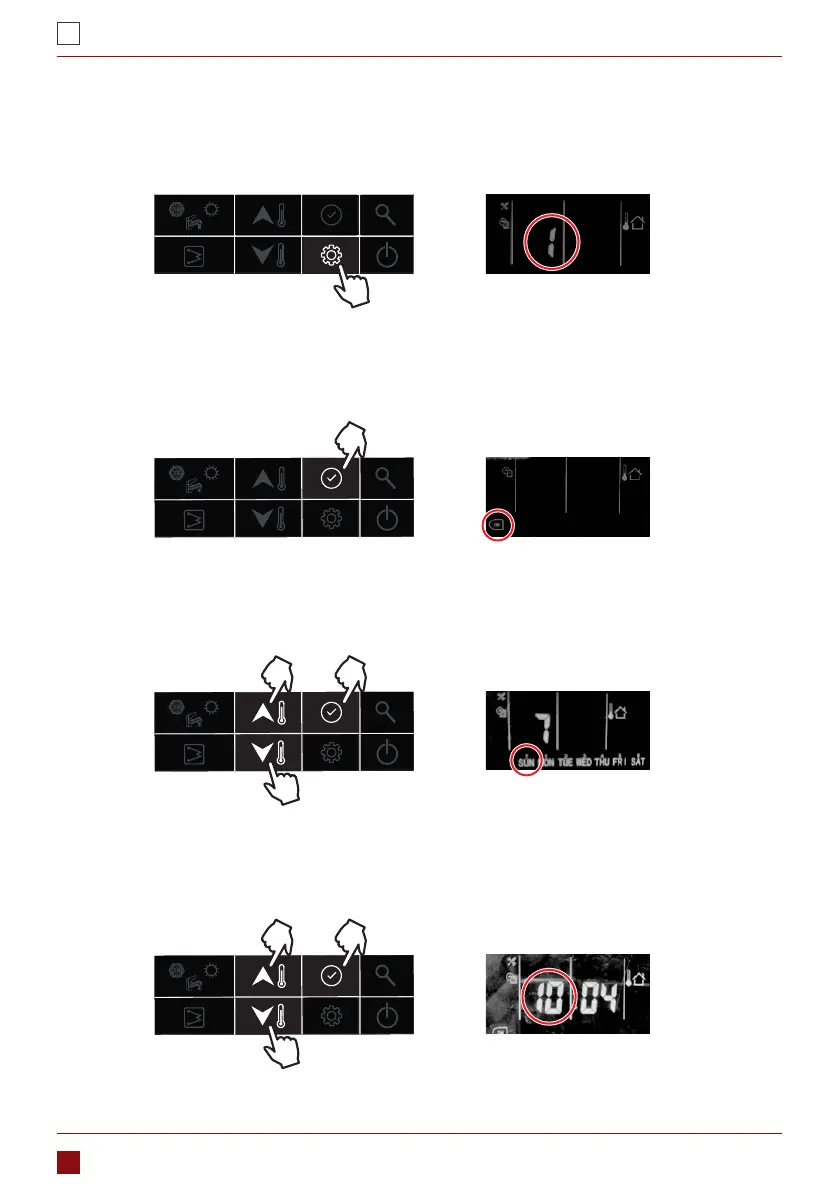
This schedule is used to set the operating of DHW mode automatically according to time schedule. Please
follow below steps to set the DHW schedule:
1. Press the “setting” button to item 1: DHW schedule setting
2. Press and hold the “conrm” button, the icon “on” will be ashing, then press the “conrm” button to
conrm, the icon “on” will be constant lighting;
3. Press and hold the “down” button to enter day setting, then press “up” or “down” button to select the day,
press the “conrm” button to conrm day setting, after that, the icon of that day will be constant lighting;
4. Press and hold the “down” button to enter hour setting, then press “up” or “down” button to select the time
in hour, press the “conrm” button to conrm;



 To Next Page