
 Need help?
Do you have a question about the rotork Skilmatic SI3 and is the answer not in the manual?
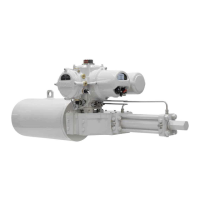
Diagram and labels for SI3 actuator parts.
Details about the Rotork Bluetooth Setting Tool Pro (BTST).
Overview of manual contents and related publications.
Important safety information to avoid injury or death.
Special conditions for safe use in hazardous locations.
Procedures and warnings for safely lifting the actuator.
Permissible orientations and steps for attaching actuator to valve.
How to adjust mechanical limits via hydraulic cylinder and spring canister.
Installation and maintenance references for RH, GH, and Linear actuators.
Diagram of terminals and earth connection details.
Steps to remove the terminal cover safely.
Information on using certified cable glands and conduit.
Procedure for connecting wires using ring crimp terminals and torque specs.
Manual override operation and preventing unauthorized use.
Steps for electrical operation and selecting local/remote control.
Explanation of the segment display elements and their meaning.
How to select and set temporary or permanent home screens.
How to connect the Rotork Setting Tool (BTST) to the actuator.
Procedure for setting and entering the actuator password.
How to set the actuator's close and open limits.
Performing full and partial stroke tests for setup and diagnostics.
Steps to remove and refit the indication cover safely.
How to adjust the actuator's limit switches.
Routine checks, cleaning, and inspection tasks for the actuator.
Procedures for replacing the filter and hydraulic fluid.
Specification of approved fuses for the actuator.
Table of weights and fluid volumes for SI3 actuators.
Reference for SI4 actuator weight and fluid volume details.
ATEX and other European hazardous area certifications.
IECEx, CCSAus, UL certifications for hazardous locations.
Certifications for non-hazardous and ordinary locations.
 General
| Brand | rotork |
|---|---|
| Model | Skilmatic SI3 |
| Category | Controller |
| Language | English |










 To Next Page