NOW OPEN THE ROVE APP: Once your camera is connected to ROVE
WiFi successfully and when you open the ROVE App, the camera will
sync automatically. You should see the live video feed from the camera
on the ROVE APP. Then keep exploring the APP from here on.
3
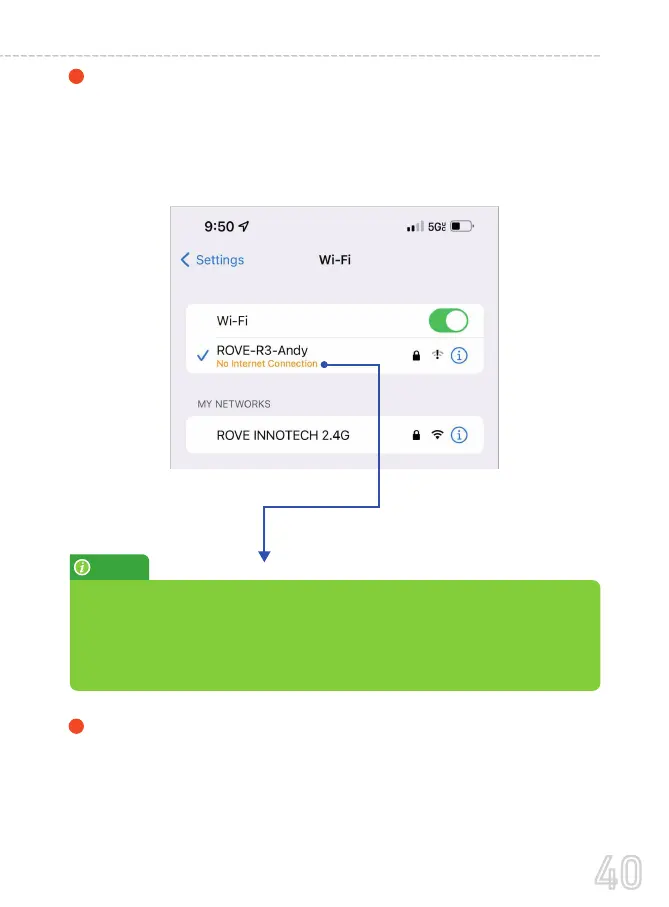
CONNECT WiFi: Now Simply join the ROVE R3 WiFi by going
into your iPhone or Android phone’s Settings > WiFi > ROVE
R3 WiFi. Then Enter the default password: 12345678. Then JOIN
the network.
2
NOTE:
If you see “
”
Please ignore this message as R3 does NOT provide internet. WiFi is only
used to make connections between your R3 and your Smart Phone, so
you can wirelessly use the ROVE APP and access the videos/settings of
your R3.
40
USER MANUAL



 To Next Page