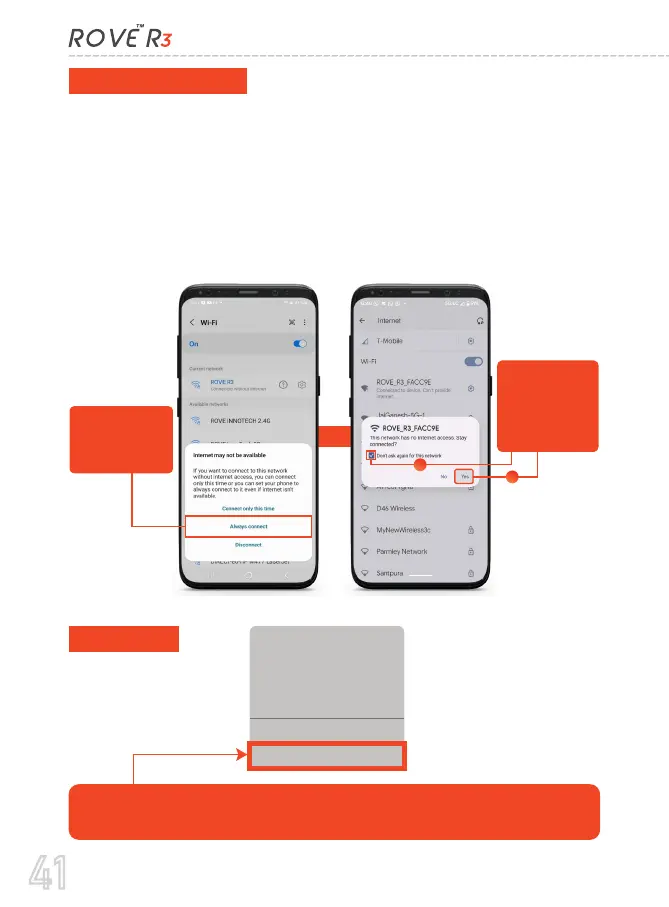
There is one extra step you will have to take for the first time. Once
you connect to ROVE R3 WiFi, it will say “No Internet”. Which is
fine. Wait about 10-15 seconds until you see the below pop up or
notification. You just have to tap on the pop up notification that
will show up in few seconds to select that you still want to stay
connected even though there is NO Internet. Once you select this
OK, you are set to go. Please contact us if you need any help.
For Android phones:
For iPhone:
The Wi-Fi network “ROVE
R3_066438” does not
appear to be connected
to the Internet
Do you want to temporarily use
celluler data?
Use Cellular Data
Keep Trying Wi-Fi
OR
When this pop up
show up, make
sure to select
“Always Connect”
When this pop up
show up, make
sure you select
“Don’t ask again”
and then select
“YES”
1
2
41



 To Next Page