Rear cam's USB-C cable to font units is not connected
properly.
4.
To solve this, remove the power cable from the camera to turn
it off.
Check and make sure there is no gap between the 3M
mount and the front camera. Make sure the camera is slid
in and locked in place.
If you have not used the ROVE's USB Car Charger, then
your car's direct USB might not be providing enough
power that is required by this 3 Channel Dash Cam, which
can reboot your R3 when it doesn't have enough power.
Please use included ROVE's USB Car Charger and try it.
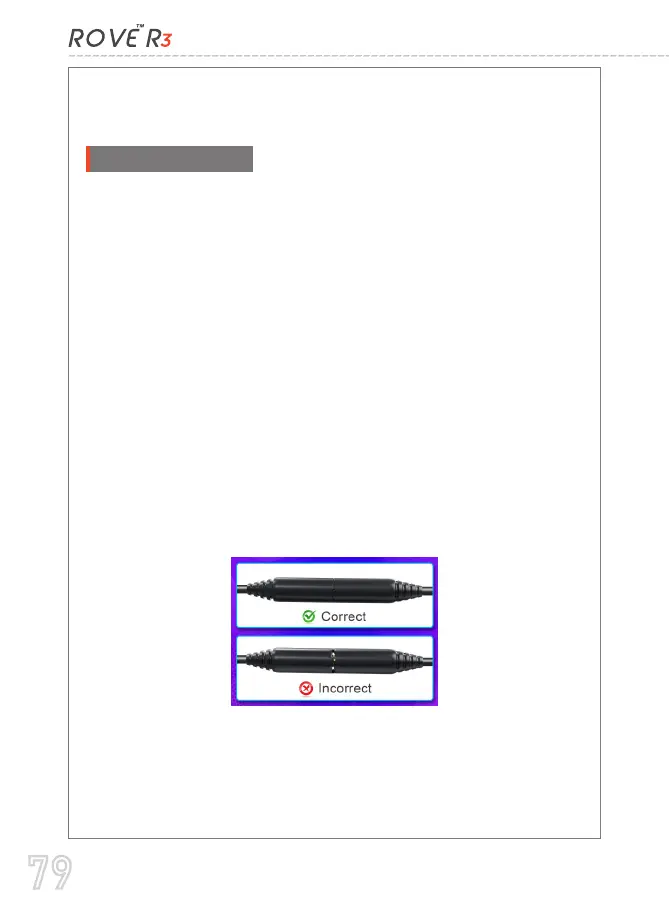
Please remove the 2.5MM Jack from the rear camera's
female jack and then re-insert while ensuring those
male/female prongs are set in place so you don't see the
metallic 2.5mm pin. See the photo below for reference.
Remove and re-insert the rear cam cable on the front/main
camera unit on top.
-- Now, re-start the camera and see if this has resolved the
issue.
1.
2.
3.
4.
79



 To Next Page