40
CHANNEL MONITOR
_______________________________________
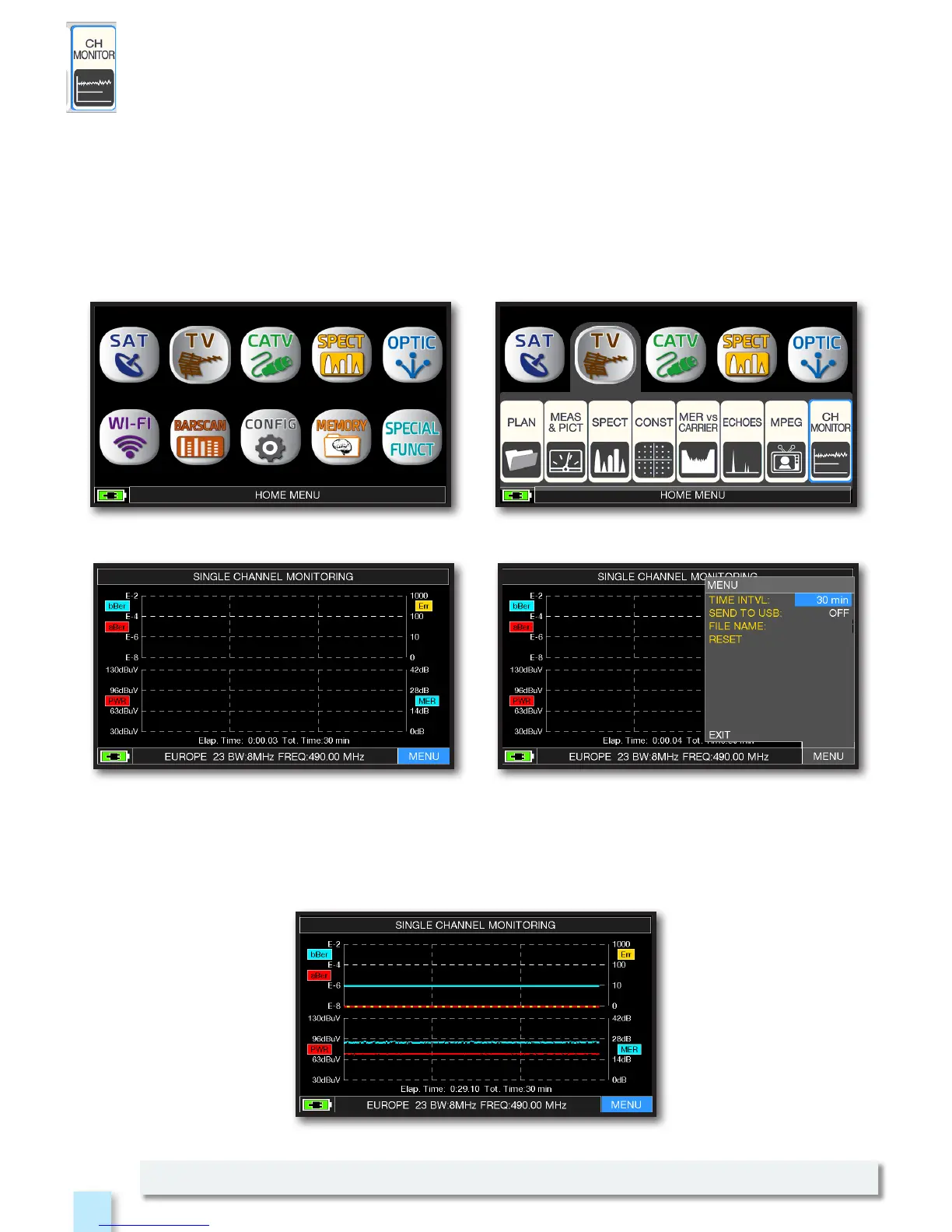
SINGLE CHANNEL MONITORING: 30 minutes.
Touch “MENU” Select the time interval (TIME INTVL) and where you
want to store the file, either in the meter’s memory,
or in the USB memory stick (send to USB-ON),
with the relative file name (File name).
NOTE: the Channel Monitor function is available also in CATV and SAT mode.
Example 1:
Press the “HOME” key. Touch “TV” and then “CH MONITOR”
or use the encoder.
The weekly application of SW CHANNEL MONITOR allow you to controll and register the trend
of the main parameters of a digital signal over time (from 30 minutes to one week): TV, CATV &
SAT. This application is indicated to resolv the reception problems which occur occasionally,
it allow you also to measure, memorize and visualize (local or in remote) the digital signals
parameters tested: DVB-S/T/C = Power, MER, ERROR, bBer, aBer; DVB-S2 / T2 / C2 = Power, MER,
ERROR, aBer, Lber, PER, LDCP.
Every registered parameters is graphically represented on the display using differents colours
for a easy identification.



 To Next Page