9
Instruction
for
Buttons
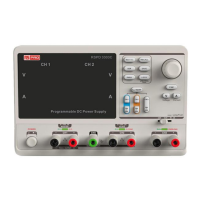
Buttons for setting parameters
NO.1-
5
: Press the button to
choose the storage location
SER
PARA
LOCK
SAVE
: Press the button to set series mode of CH1/CH2.
: Press the button to set parallel mode of CH1/CH2.
: Long press the button to turn on/off the keylock function.
: Press the button to enter the storage system for saving files.
RECALL
: Press the button to enter the storage system for recalling files.
Buttons
for
controlling
the
channel
CH1
CH2
: Press the button to select CH1 as the current channel
: Press the button to select CH2 as the current channel
ON/OFF
: Press the button to turn on/off output of the current channel
CH3
ON/OFF
: Press the button to turn on/off the CH3 output.
ALL
ON/OFF
Other
buttons
: Press the button to turn on/off all channels
FINE
V
A
: Press the button to open the fine adjust function and modify the
parameter in the minimum step
: To select between voltage and current.


 To Next Page