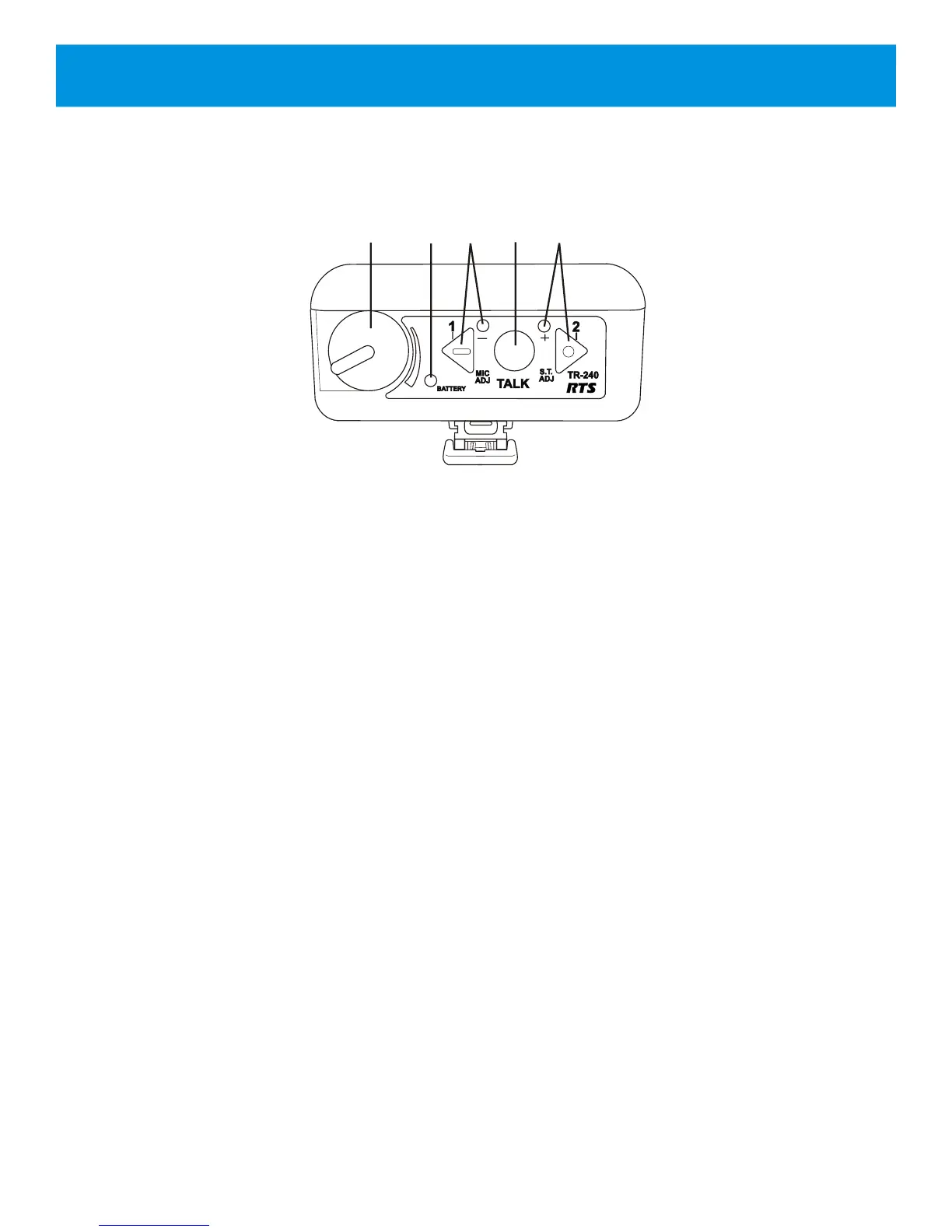
1. On/Off & Volume Control – turns the beltpack power
on/off and controls headset volume.
2. Battery Light –
GREEN = Battery OK
YELLOW = Battery Low (~15 mins. of use left)
RED = Battery Low (battery needs charge)
3. Channel <1> “Green” Button and Light – selects the
“Channel 1” intercom. The green light next to the button
will illuminate upon selection.
4. <TALK> Button – press to enable/disable the audio
path from the headset microphone.
The active intercom channel light will remain
illuminated when the microphone path is enabled. The
active intercom channel light will blink when the
microphone path is disabled.
5. Channel < 2 > “Blue” Button and Light – selects the
“Channel 2” intercom. The green light next to the button
will illuminate upon selection.
Section 3 - TR-240 Beltpack
3-1
Figure 3-1
TR-240 Beltpack
Top View
Controls and Connections - Top Panel



 To Next Page